Storage Tech
- Shulker box tech
- Box basics
- Box loaders
- Box unloaders
- Box splitters
- Box mergers
- Box sorting
- Temporary Storage (for bulk)
- Input handling
- Item storage
- Item Streams
- Item Sorting
- Stackable Sorting
- Nonstackable Separators
- Sixteen-Stackable Separators
- Block Property-Based Nonstackable Sorting
- Dispenser/Item-Property Based Nonstackable Sorting
- Crafter-Based Item Sorting
- Unsortable Nonstackables
- Crafter Tech
Shulker box tech
Box basics
All you need to know to start learning about shulker box tech
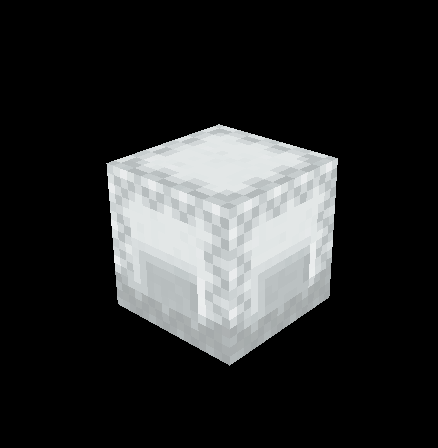
Shulker boxes are the basis of many parts of storage tech. They are crafted from 2 shulker shells (acquired from killing a shulker mob) and a chest. Essentially, they are a movable chest. When breaking a shulker box, its inventory is maintained while in item form, making it an excellent way to transport and store items efficiently.
Box loaders
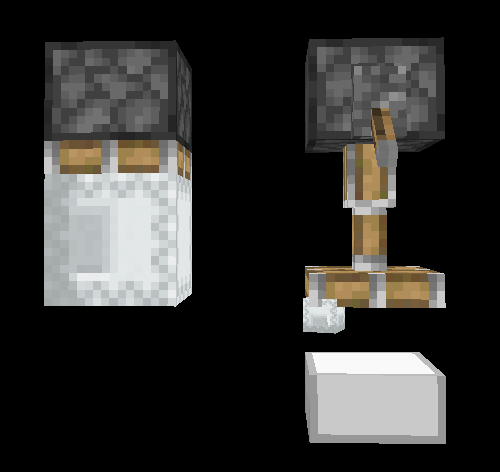
Box loaders are a common storage tech contraption that takes in items and "loads" them into a shulker box using hoppers or droppers. They can be used to compact items into smaller spaces and make handling items easier for both the player and storage systems.
Fundamental Mechanics:
It is useful (and often required) when designing loaders to know how filters work. Please see this page for an in-depth explanation of item filters. Second, you need to know how shulker boxes are automatically placed and broken in the world. This page explains that.
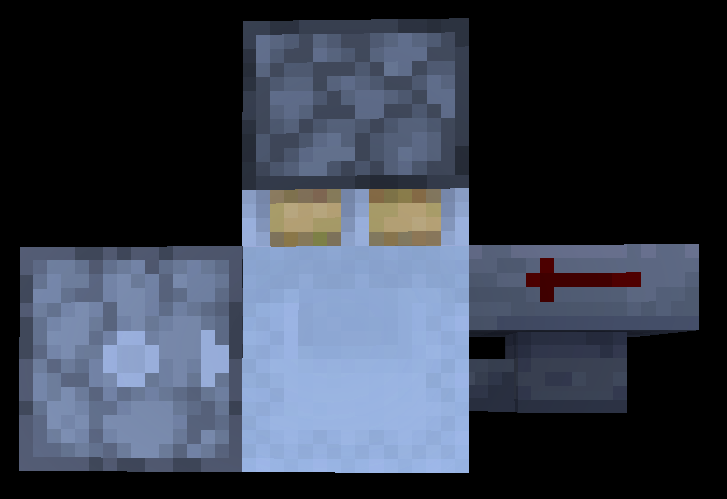
For a box loader to function, there are three components that need to interact with the box to be loaded.
- A dispenser to place new empty boxes when one fills up,
- A hopper/dropper to fill the box with items from the loader's input,
- A piston to break the box once it fills up.
The image below shows a common layout for a single-hopper speed loader that includes all three of these components
Box unloaders
A Box unloader is a contraption used to take items out of a box. They are used to move items somewhere else like a chest. They are also used in storage inputs to send items around a storage. There’s lots of different types of unloaders such as:
FITs (First Item Type) a unloader that only unloads the first Item in the box.
shulker yeeters a system that unloads a box instantly but burns the actual box they are not used very often for that reason.
arrays these are multiple unloaders that run it parallel to increase item output commonly found in bigger storages. They have some extra logic to make sure each unloader is unloading a different item type.
SSUs (sequential shulker unloader) this type of unloader has a filter for the items so each unloader only unloads one item. If the box doesn’t contain that item it will be moved into the next unloader and so on until it finds the right unloader. This type of unloader is very useful because they can unload in parallel to increase speed.
Box splitters
A box splitter splits the items in the box into non-stackables and the other items are loaded into boxes. The loaders replace the box whenever the item changes, so you end up with lots of boxes with a single item type. And the non-stackables are sent down a separate water stream
Box mergers
A box merger takes in 2 boxes of the same item type and combines them into one or more boxes. It will place the most full box out of the two and unload the least full. What it’s doing is unloading a box into a loader. The loader box will ether get loaded as normal and you send up with a partly full box and a empty box, however if it completely fills it will break both boxes and you end up with 1 full box and a partly full box.
Box sorting
Box sorting is very powerful especially when used in the correct way but first what is a box sorter?
box sorting works by seeing what is in the first slot of a box and taking one item out. It will then send that item and the box into two separate item transportation lines. The item will be sent over a ton of filters and if the item if picked up by the filter the box will be inputed into the slice. This is timed perfectly so that the correct box is inputed. The item is then returned to the box.
note: there’s some types of box sorters that can change their filter item these are known as SVARs
you can also get a box sorter that can sort boxes based on if they have a specific item or not these are known as box searchers. The difference is the box is placed on top of a filter instead of a normal hopper. If that filter is triggered it will redirect the box into a item to box rerun note: because it’s placed on a filter it can check all 27 slots not just the first
this is incredibly powerful because you can sort 1728 items in one go with a 8gt sorter that’s 15.5 million items per hour. These are commonly used in bulk storages. Or to filter out unwanted boxes like ones that include filter items that you use in a storage
Temporary Storage (for bulk)
The following page does not apply to loader-based bulks nor any bulk that accepts loose items (as opposed to full shulker boxes) as input.
Temporary "temp" storage is a front-logic component for a merging array (see the Mergers page). Temporary storages will hold up to one partially-filled shulker box of each item type assigned to the bulk section of a storage. It is also an option for non-bulk to be stored in temp in the case of "smart" encoded halls that place shulkers in chests that are half full. Temp storages must hold this box because mergers cannot do anything with only a single box of an item type, so the temp will hold a box until it receives an box of duplicate item type from the output of the bulk whitelister, which sorts boxes of chest hall/MIS/NS from boxes of bulk items.
There are 2 common ways that temporary storages are set up, depending on the sorting method:
Encoded Temporary Storage (AKA Disc Drive)
In encoded systems, each item type is assigned to a binary or hexadecimal "code" which informs the system of where to store the item type. In encoded temps, this code is used to locate the box into the silo, which has a slot for each item type assigned to merging (note again that encoded systems sometimes allow chest hall items to be routed through mergers). For speed and convenience reasons, the slots are split across different inventories, typically barrels containing 16 slots each.
EX: an 8 bit/2 hexit temp allows up to 256 item types. 4 bits/1 hexit can be utilized to select a single barrel out of 16 in a row, and the remaining 4 bits/1 hexit can be used to select one of the 16 slots inside the barrel. 16 barrels, 16 slots each, 16x16=256 total slots.
When not holding a box, these slots are filled with an unstackable filler item (usually water bottles, although some use water buckets to store unused filler items at 16x efficiency in the form of empty buckets).
The machine first receives a partially full, single-item-type box along with its code. A decoder selects the matching inventory, and a variable clock removes as many items as needed from the inventory to access the selected slot. The last item removed is put through an isBox sorter (see nonstackable sorting). If the slot contained a box, then the inputted box and previously stored box will be ejected to the input of the shulker box merging array. The now empty slot is then replaced with a filler item. If the slot contained a filler item, the filler item is replaced with the inputted box. All removed items are returned to the matching barrel in the same order they are removed. The temp is now ready to receive another shulker box/code.
Non-Encoded Temporary Storage
Non-encoded systems have no way of identifying the item type inside of a box without a filter, so the mechanism is more complex than an encoded system's temp. However, the explanation is shorter because there are far fewer steps. Boxes without matches are stored inside an unorganized silo.
The machine receives a partially full, single-item-type shulker box. It uses an item in that box to set a variable filter, and then allows all boxes in the silo to be checked against the item type in the filter. If any box in the silo's item type matches the item type of the inputted box, then both are ejected to the shulker box merging array. If there are no matches, then the inputted box will be placed into the silo to be checked against for later box input. The temp is now ready to receive another box.
Non-encoded temps are generally slower than encoded temps, especially if there are a lot of boxes in the silo.
Input handling
Types of Input
Loose Item Input:
The simplest form of input, loose item input is when items are placed directly into the system as-is, either by throwing them into a water stream or into a chest/barrel. Loose items inputs sometimes automatically sort out unstackables (such as tools, armor, and potions) and redirect them to nonstackable storage.
In more complex systems, loose items are placed into shulker boxes, either by a manual loader or chest into a mixed loader.
Shulker Box Input
In nearly all cases, it is more efficient to input into a storage using shulker boxes (note that this requires an unloader, see the Unloaders page for details). Because of this, most large storages will have an input UI (user interface) that allows direct input of mixed-item-type shulker boxes into the system.
This input type usually requires protection from accidental loose item input using a shulker box sorter (see the nonstackable sorting page). The items sorted out are usually returned to the player or loaded into a box.
Direct Bulk Input
The following section only applies to encoded and box sorting-based bulk systems.
High volumes of single-item-type, full shulker boxes will slow down a storage and waste time splitting, unloading, and merging. If the item type in the box is in the bulk storage, then it is sometimes impossible to manually place a box into a chest (as is recommended for already full, single-item-type boxes). To solve this issue, input systems sometimes include a chest that leads directly to the input of the bulk hall, bypassing the splitting array and unloading array.
This is not possible for bulks that use loaders at the top of the slice, as they only accept loose items as input.
Input Buffers
Input buffers are an optional component of an automated storage system. The input buffer will accept items from the input UI (usually in the form of mixed-item-type shulker boxes) and hold them until the storage is given the instruction to "run".
Input buffers are usually used in the case that a storage does not have a ticking area attached to it, as a player cannot walk away from a running storage without danger of unloading it. The buffer allows the player to choose when the storage will run, and therefore allows them to leave immediately after inputting items.
Input buffes are also sometimes used as a speed optimization. Unloading arrays can only be fully utilized when their input volume is larger than a single box, and the more shulker boxes past that single one, the higher the rate that items will be stored. Thus, holding the input until at least a few boxes have built up is better for raw speed.
Input buffers have a minor drawback in that, until the storage is allowed to run, the most recently inputted items are inconvenient to access.
Item storage
Chest Halls
In most cases when designing a storage system, you will want to include storage for items where each item gets at least a chest of storage space. However, there can be hundreds of item types stored in this way, so to avoid comically long hallways, chest halls are commonly used.
A chest hall is any hall in which a single 1 block wide slice holds multiple accessible chests attached to filters, each sorting a different item type. There are nearly infinite possible different variations on chest halls.
User Interface (UI)
The UI of a chest hall affects its general usability by the player. For example, if not all chests can be reached from the center, or if a very small sliver of a chest is visible to the player, it my be frustrating to use. As with many things, UI is mostly subjective, and many people have preferences that go beyond accessibility etc.
Usually, chest halls have "display blocks" that show which item is stored in each chest, for easy visual searching of your storage. Sometimes it is not possible for a UI to have all solid blocks as displays (most solid blocks prevent chests from opening), so an item frame or transparent block must be used.
Chest Count
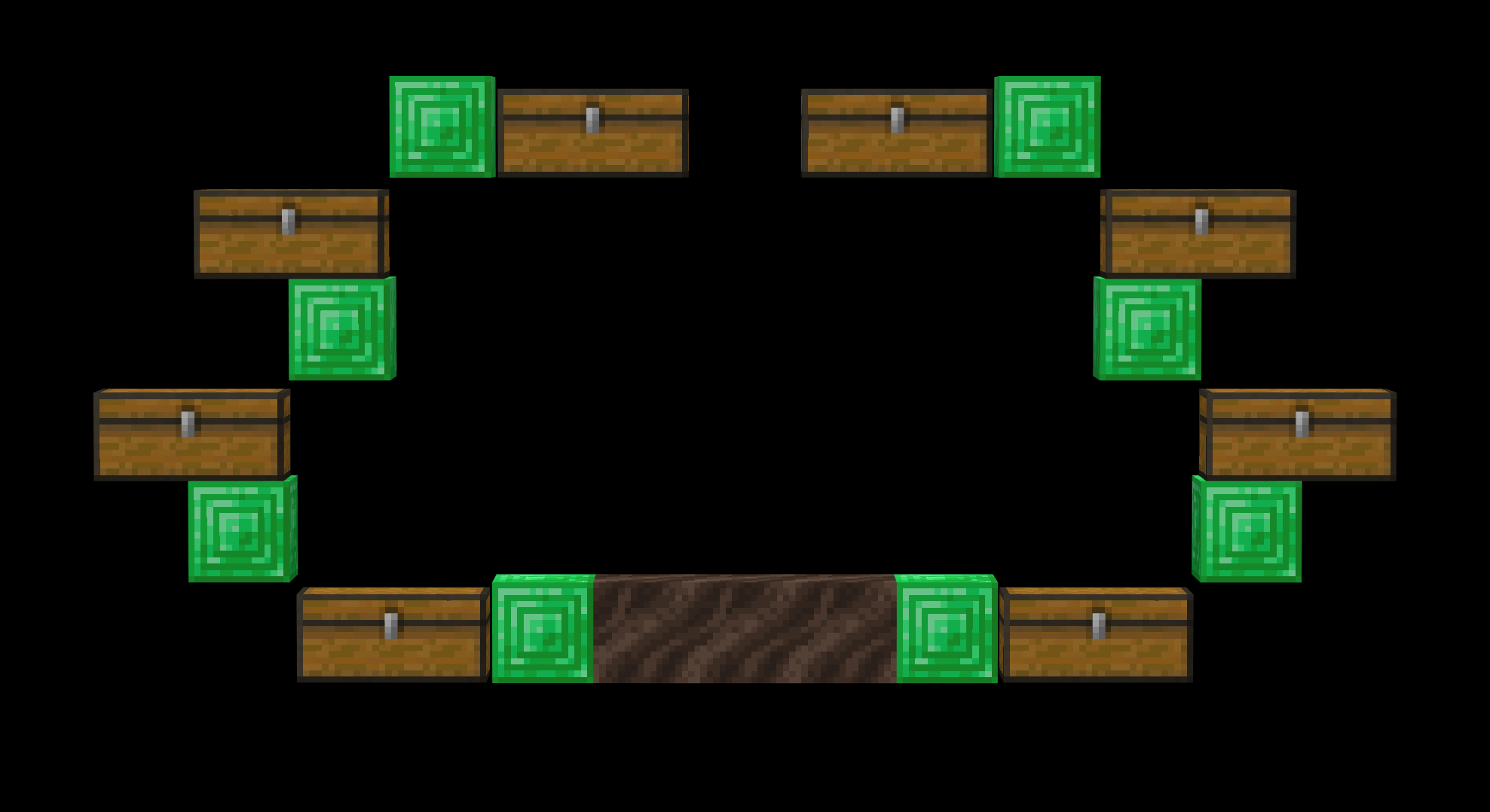
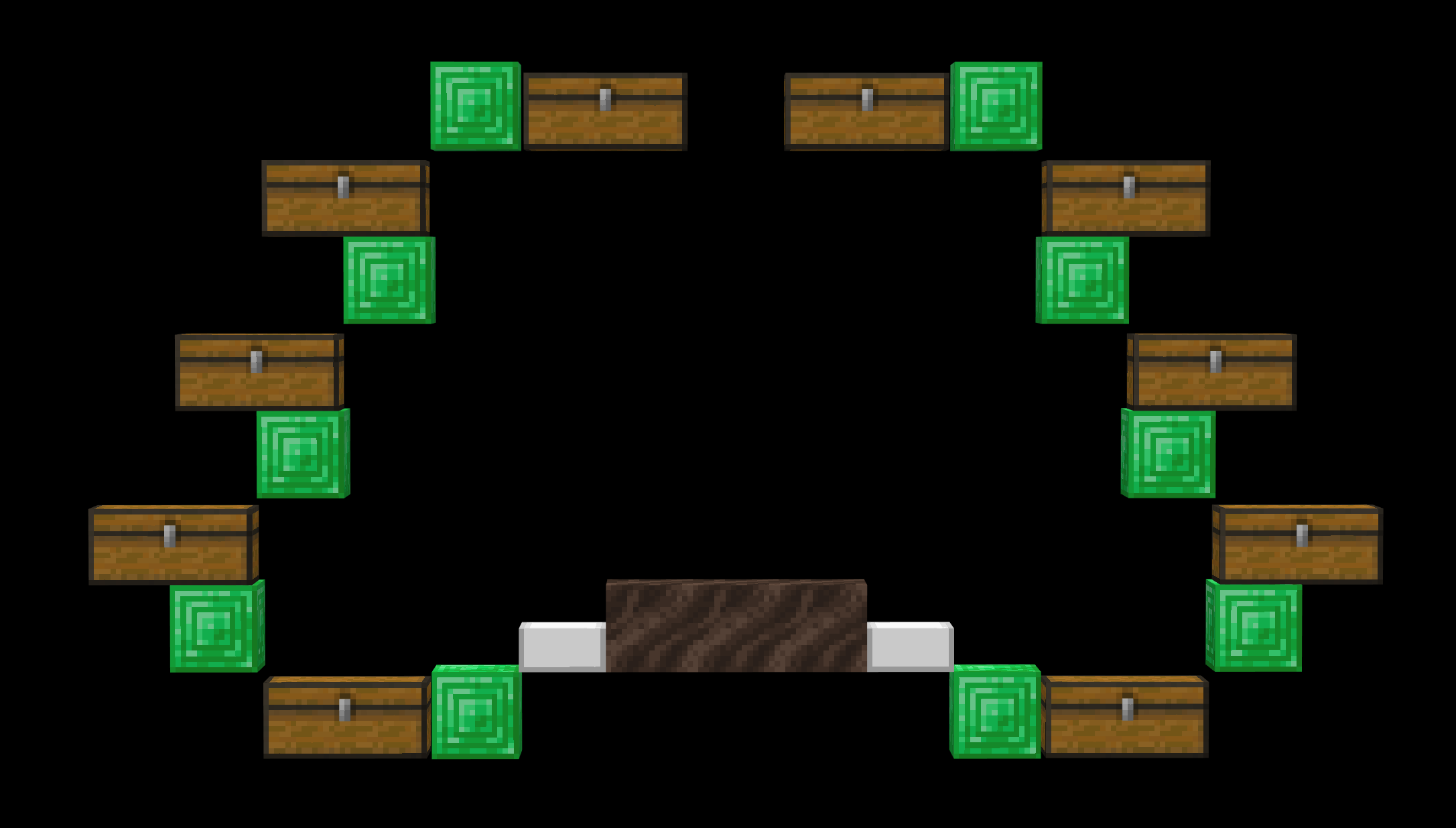
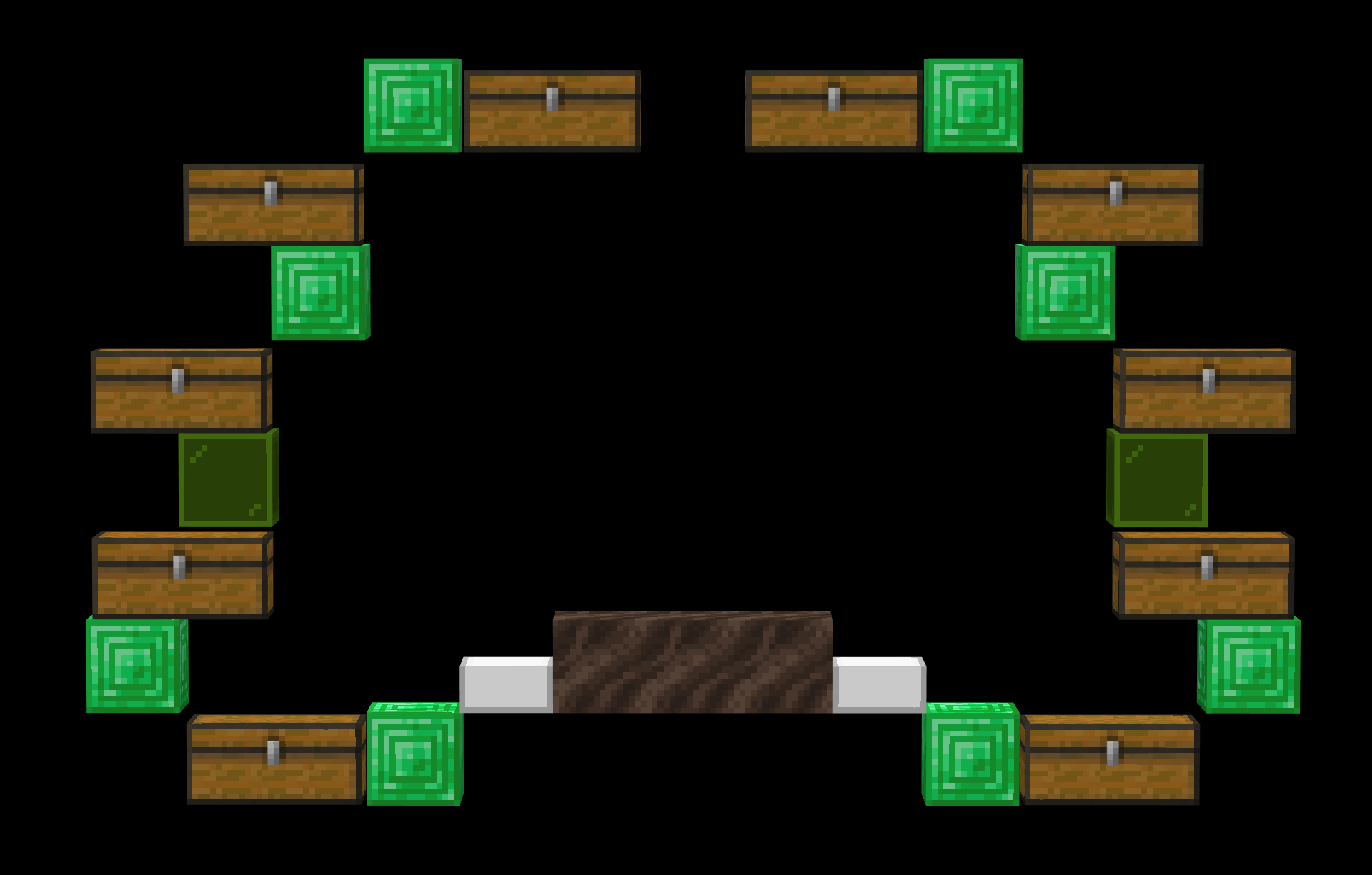
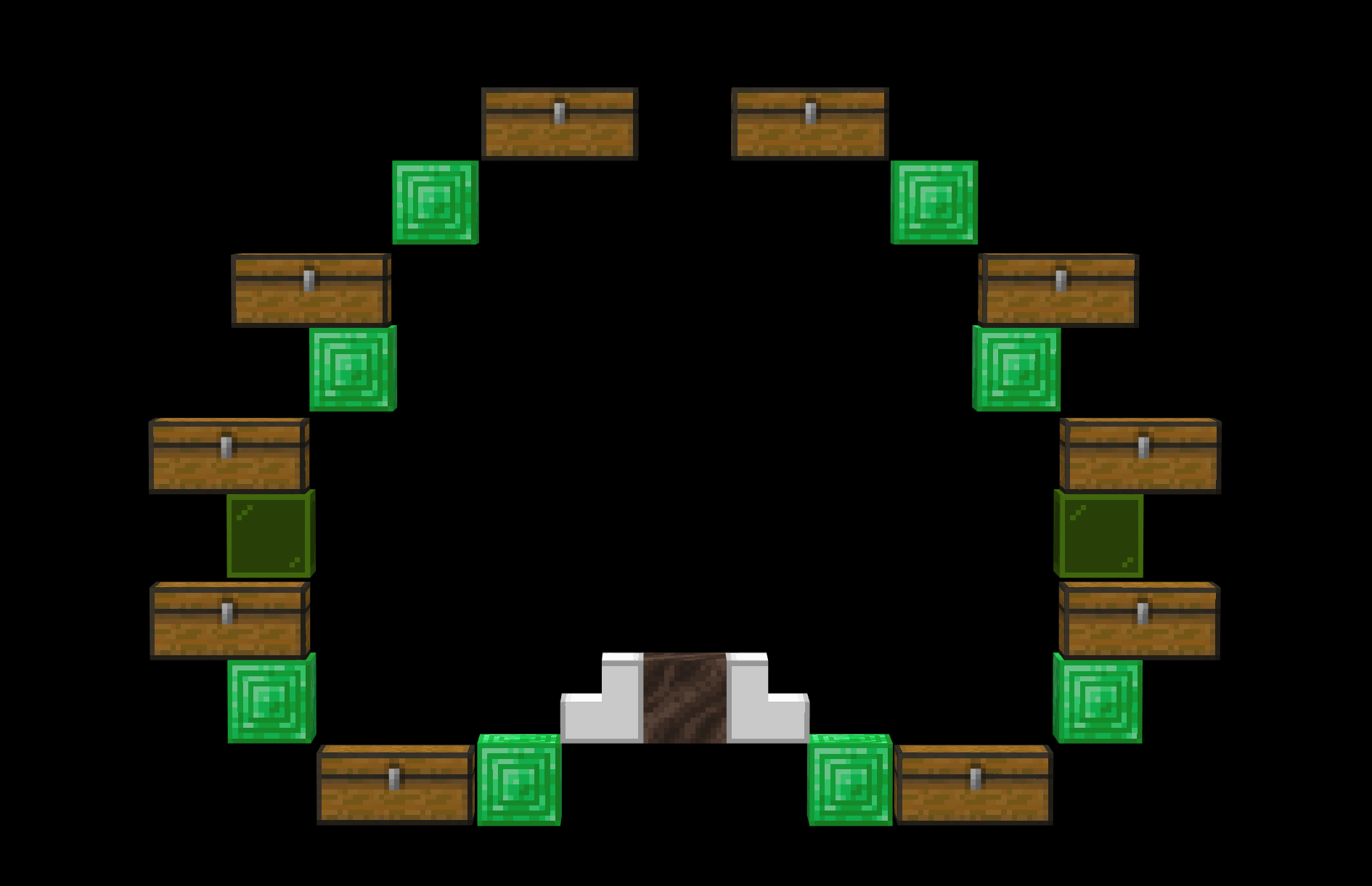
Generally, a chest hall can hold anywhere between 2 and a lot of item types. The most common halls are "octa" (8 chest) and "deca" (10 chest) halls.
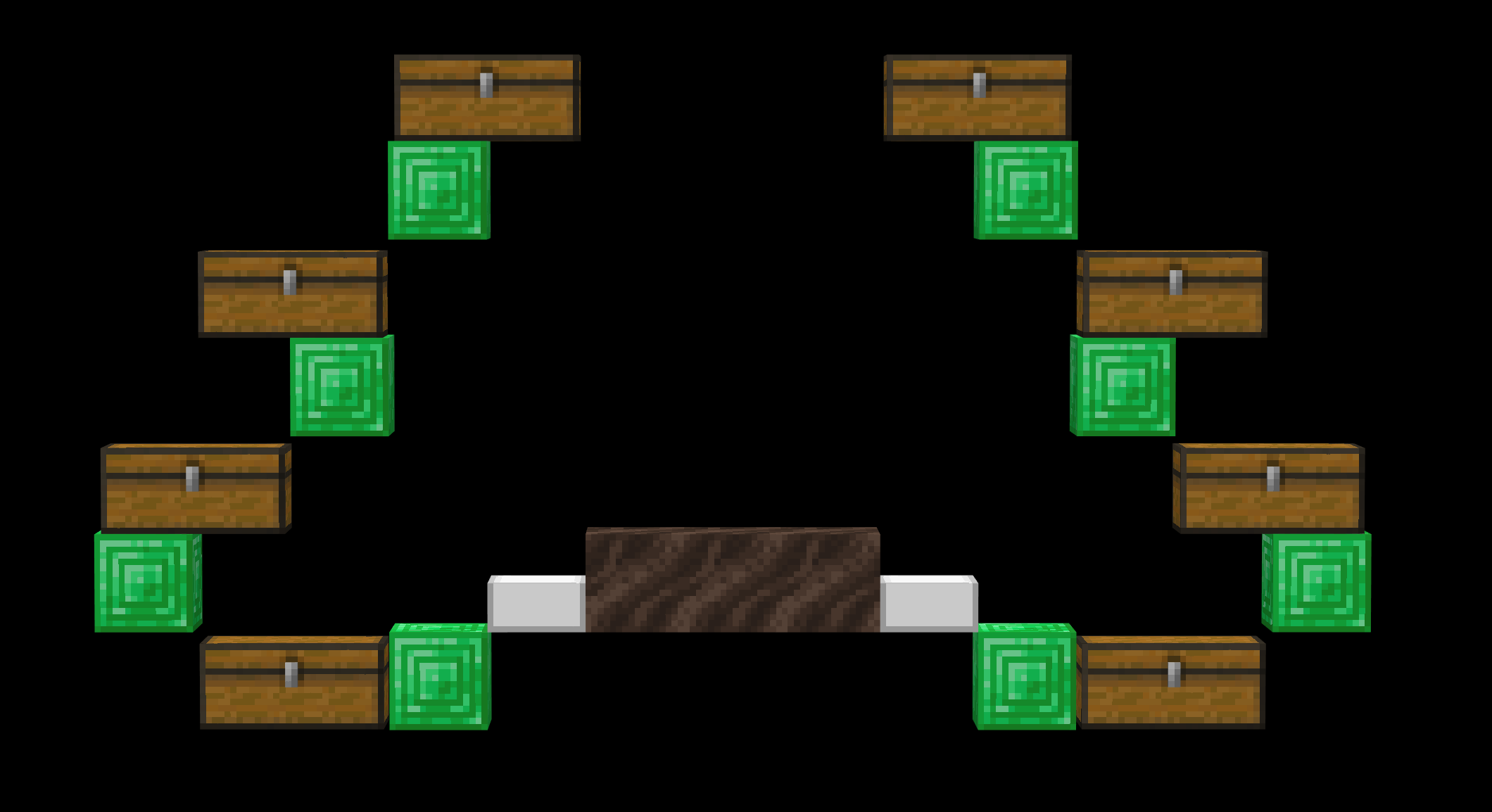
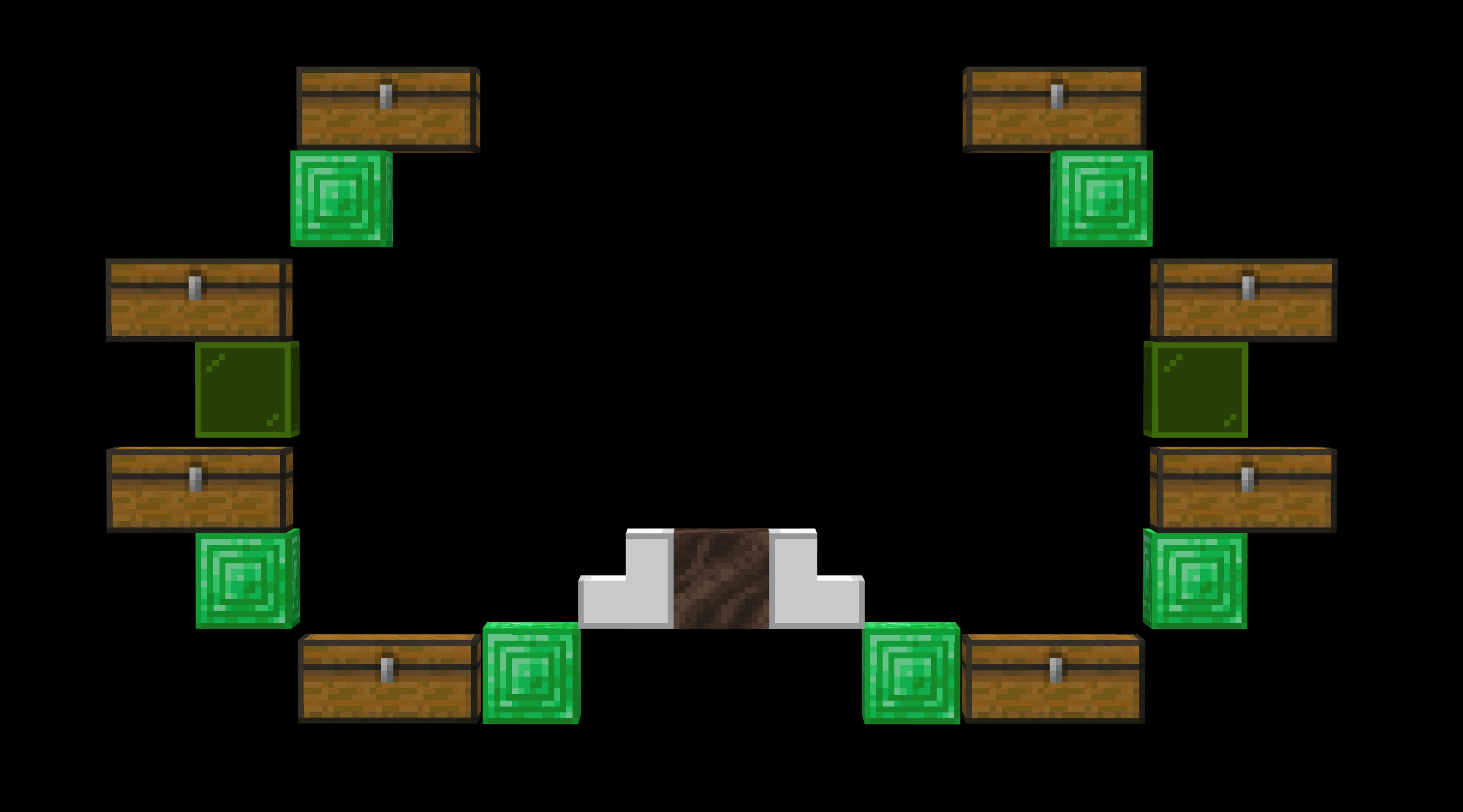
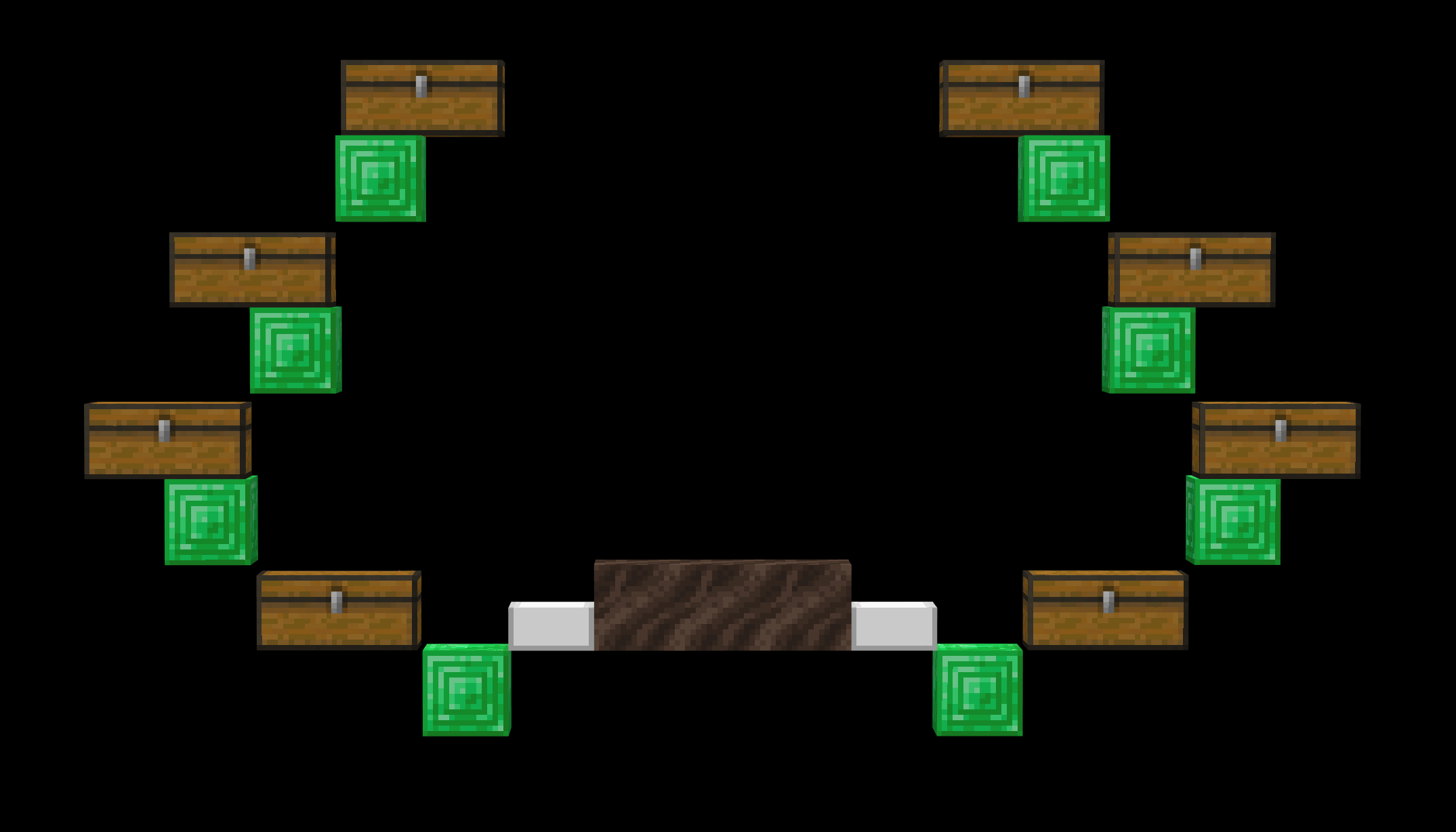
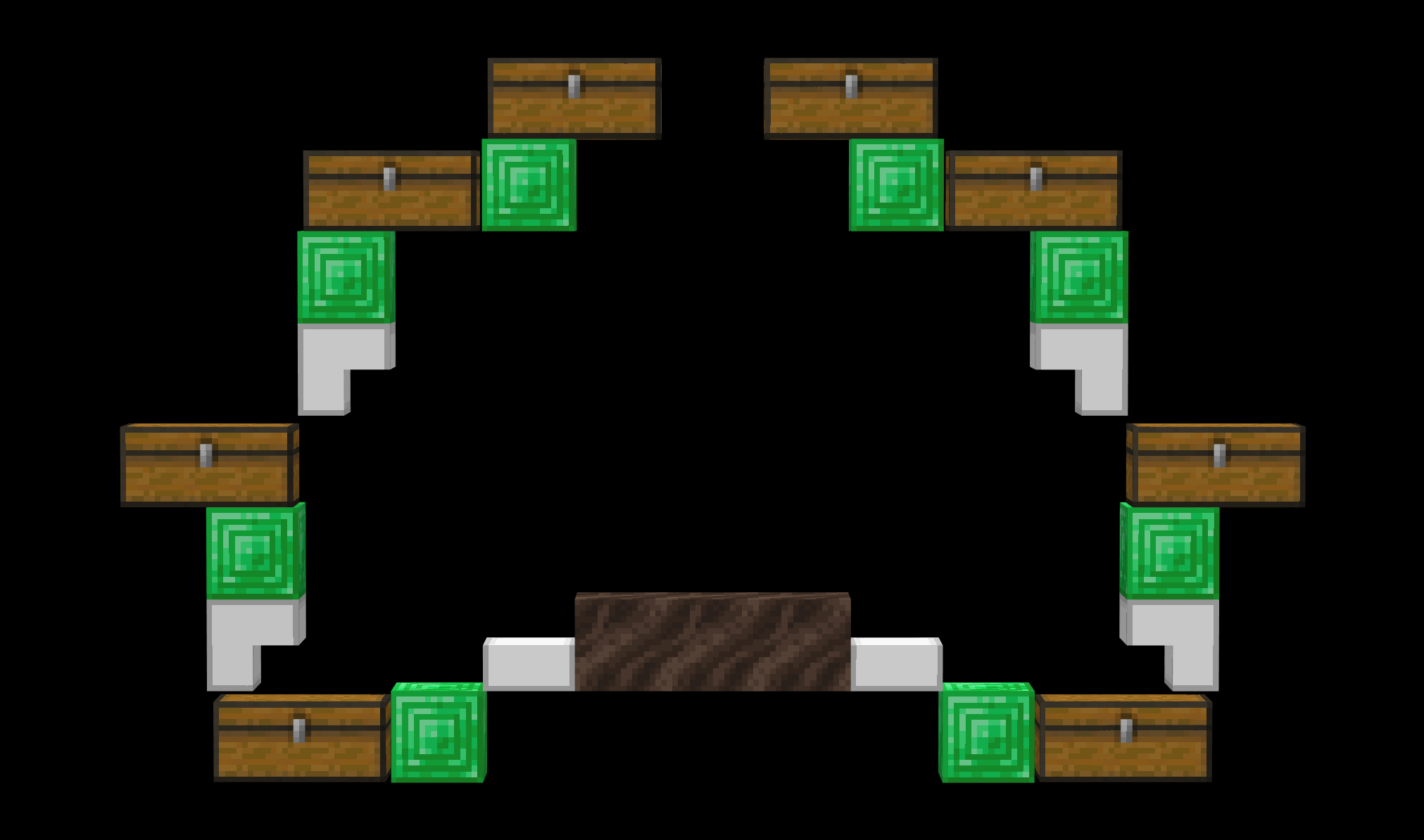
The following is a list of some common UIs for chest halls. Emerald blocks represent solid displays, lime glass represents transparent displays (needs an item frame for solid block). Note that the UI of a chest hall is up to the person wiring it, and they absolutely do not have to follow one of these. They are just for inspiration.
Octa Halls
Deca Halls
Wiring a Chest Hall
The complexity of a chest hall is entirely dependent on the features the designer desires. Below is an example of about the most basic possible chest hall, wired over the Galahad UI. On the right side, the filters' wiring is differentiated by color. Note the different styles of filters used. For more information on filters, see stackable sorting.
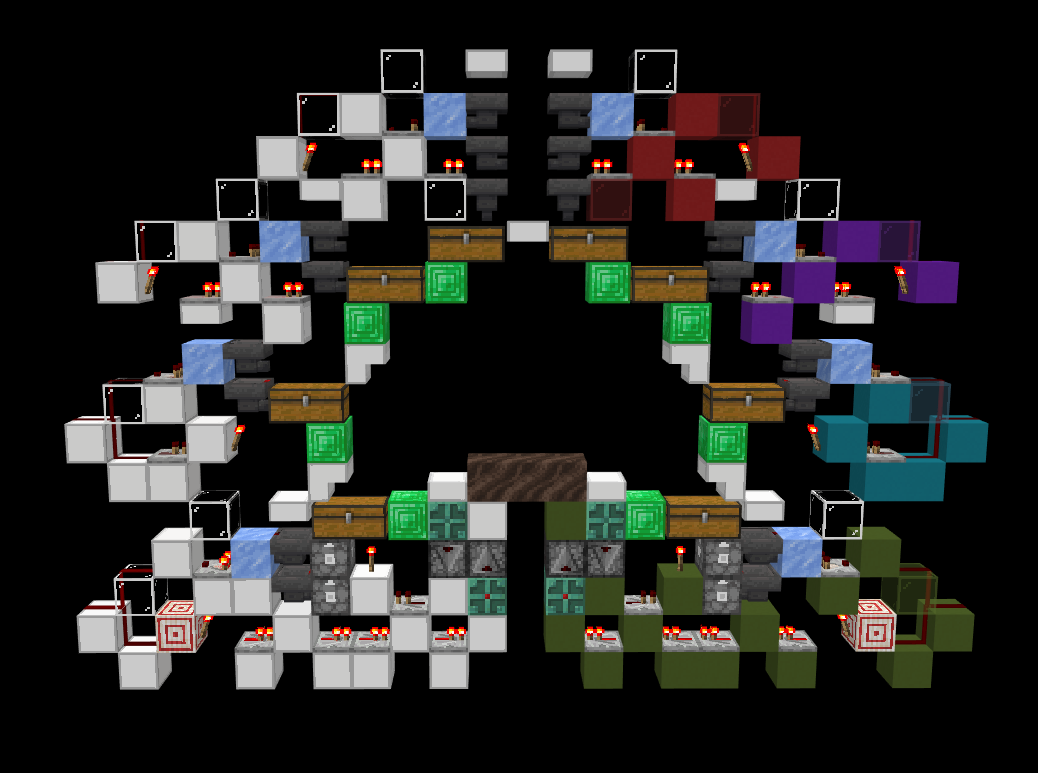
One of the more difficult filters to wire is usually the bottom filter, which often requires a dropper elevator (note that a special property of the Galahad UI is that it does not require a dropper elevator, but is wired with one for an example). It is best practice to use the filter to turn the dropper elevator's clock on and off to prevent too much lag, noise, or pending ticks. Ensure the clock is at the speed of the filter (usually 8 game ticks). In this case, copper bulbs and observers are used for the clock,
While the above design is perfectly functional and will likely serve most players well, there are a great many things that we can improve about it. The most common (and simple) optimization one can make in designing a chest hall is hopper locking. When locked, hoppers produce about half the lag they would otherwise. Note that a hopper containing items (such as a filter hopper) is significantly laggier than an empty one, so those should be prioritized. Because many hoppers cannot be locked during normal operation, global locking must be used to lock the chest hall only while it is not sorting items. The image below shows one way to fully hopper lock the above hall. Red blocks indicate global locking.
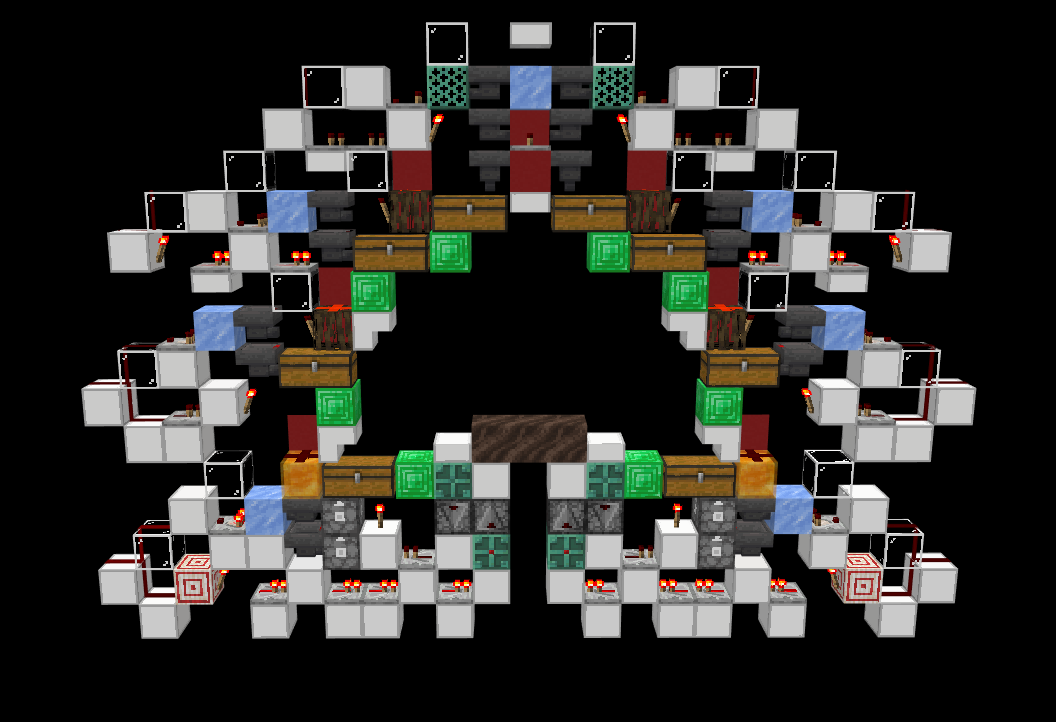
There are a few things that can be learned from this new version of the hall.
- Copper grates are used because they allow comparators to read through them while also being non-conductive,
- Mangrove roots are used because they are the only conductive block that allows a chest to be opened underneath it.,
- The full complexity of the slice cannot be shown with only a single tiling of the slice anymore. Here is where we must learn AB Tiling
Item Streams
In most cases, a simple line of hoppers is both the slowest and most expensive option for item distribution, so how do you optimize moving items for speed and cost?
Ice & Water Streams
The most common method of distributing items across a set of filters is the ice/water stream. A ice/water stream is comprised of 3 parts: The alignment, the ice, and the hoppers. (note that the hoppers on the stream don't have to be filters, its just easiest to imagine them as such, as they most commonly will be filters, as in a chest hall)
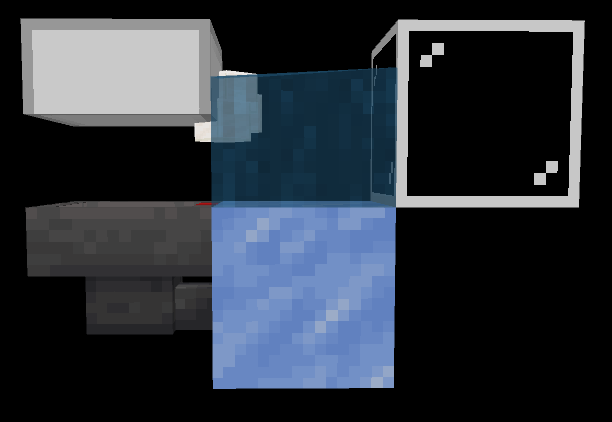 A common setup for a water & ice stream. The items are sitting above both the ice and hopper.
The hoppers are placed just as they would be if a line of hoppers were being used for distributing items: All in a row.
The ice is used to allow items to slide through the spaces between flowing water. It is placed directly next to the filter hoppers, with a non-full block placed on top of them, such that items could be aligned on top of both the hoppers and ice. The most common blocks for this are scaffolding, top slabs, or glass panes. Blue ice has a negligible effect on the speed of a water stream.
The alignment is the most difficult part of a water stream, although it is still easy to set up. There are a few options for alignment depending on the direction the items are being input from. The images below show the most common situations. Note that although chests, ender chests, anvils, and grindstones are popular options for alignment, anvils/grindstones only work when the ice stream is facing a certain direction, and chests/ender chests are tile entities, making them more laggy than honey blocks.
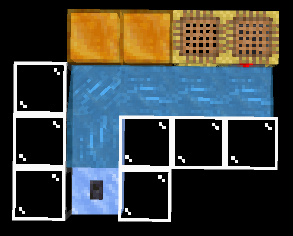 The honey blocks are slightly smaller than a full block, so they align the items where they need to be. The hoppers are below the scaffolding.
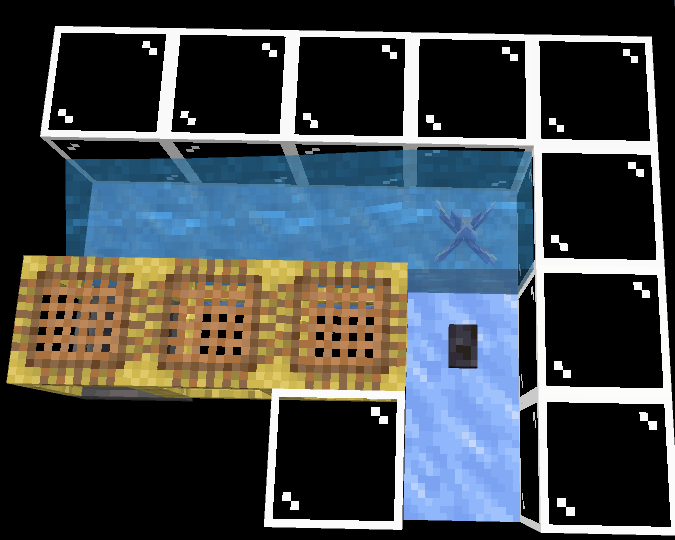 Another method for aligning items. The amethyst bud is medium size.
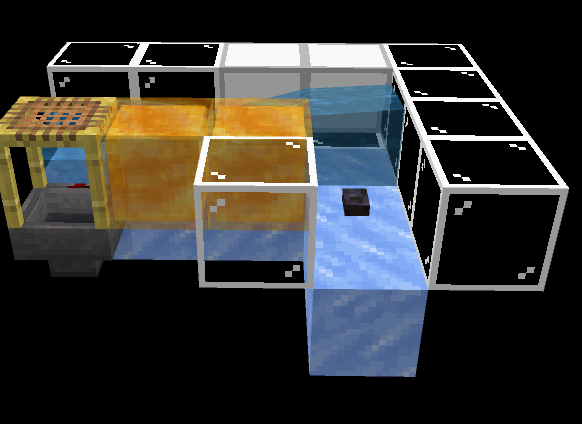 A third, less common method of aligning items. The stairs bounce the items into the honey. Note that there needs to be glass below the stairs.
Iceless Water Streams
There are some situations in which you cannot use ice in a water stream, but still need to extend it beyond 9 blocks (the limit for a single source pushing items across hoppers). In this case, you need to jump the gap between sections of water by giving the items enough momentum and height to make it across. The only situation in which this is possible is by using sections of water that are 3 blocks long.
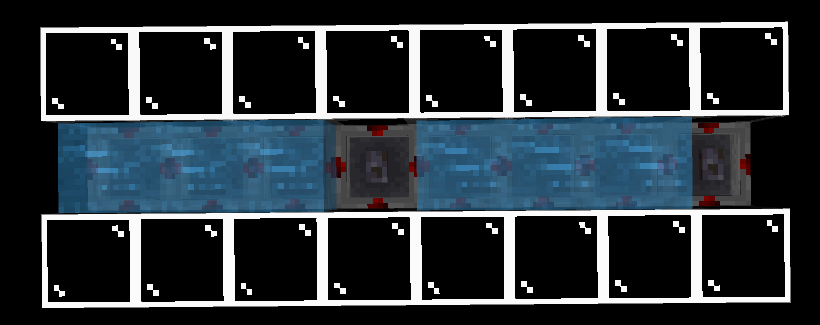 Note that the items need to be aligned over the raised edge of the hopper.
Tips For Special Water Streams
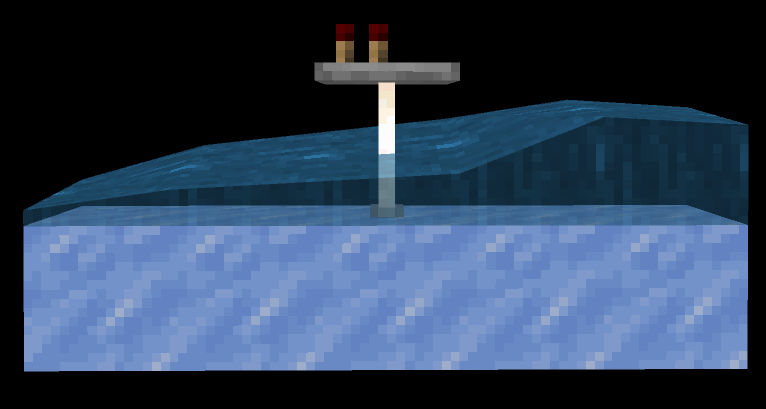 End rods allow water to flow through them, and also allow repeaters to be placed on top of them.
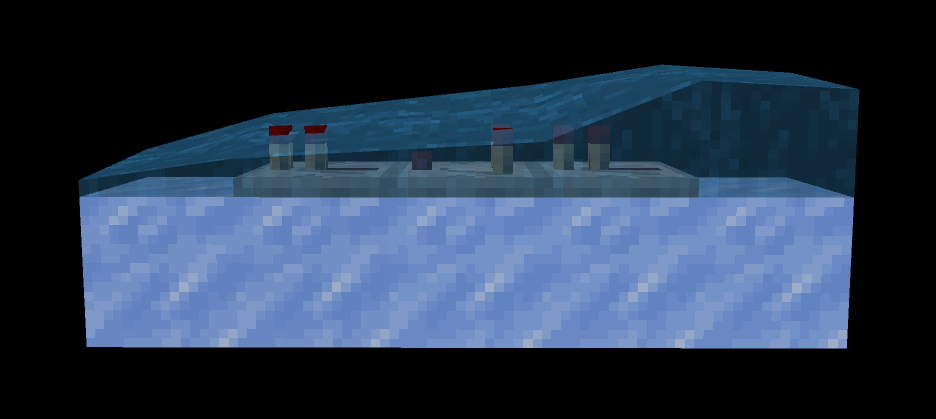 Comparators and repeaters allow water to flow through them.
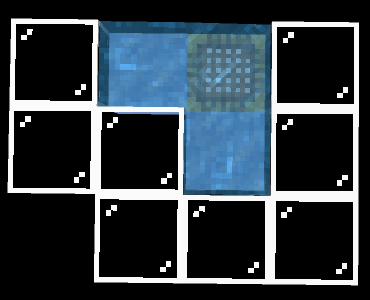 Scaffolding stops water sources from generating. This can be used to create flowing water where it wouldn't be possible otherwise.
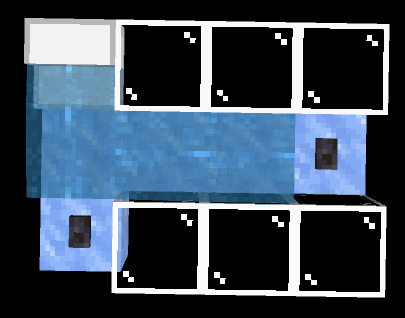 Using a setup like this, water flow can be redirected without taking any extra space.
Waterless Item Streams
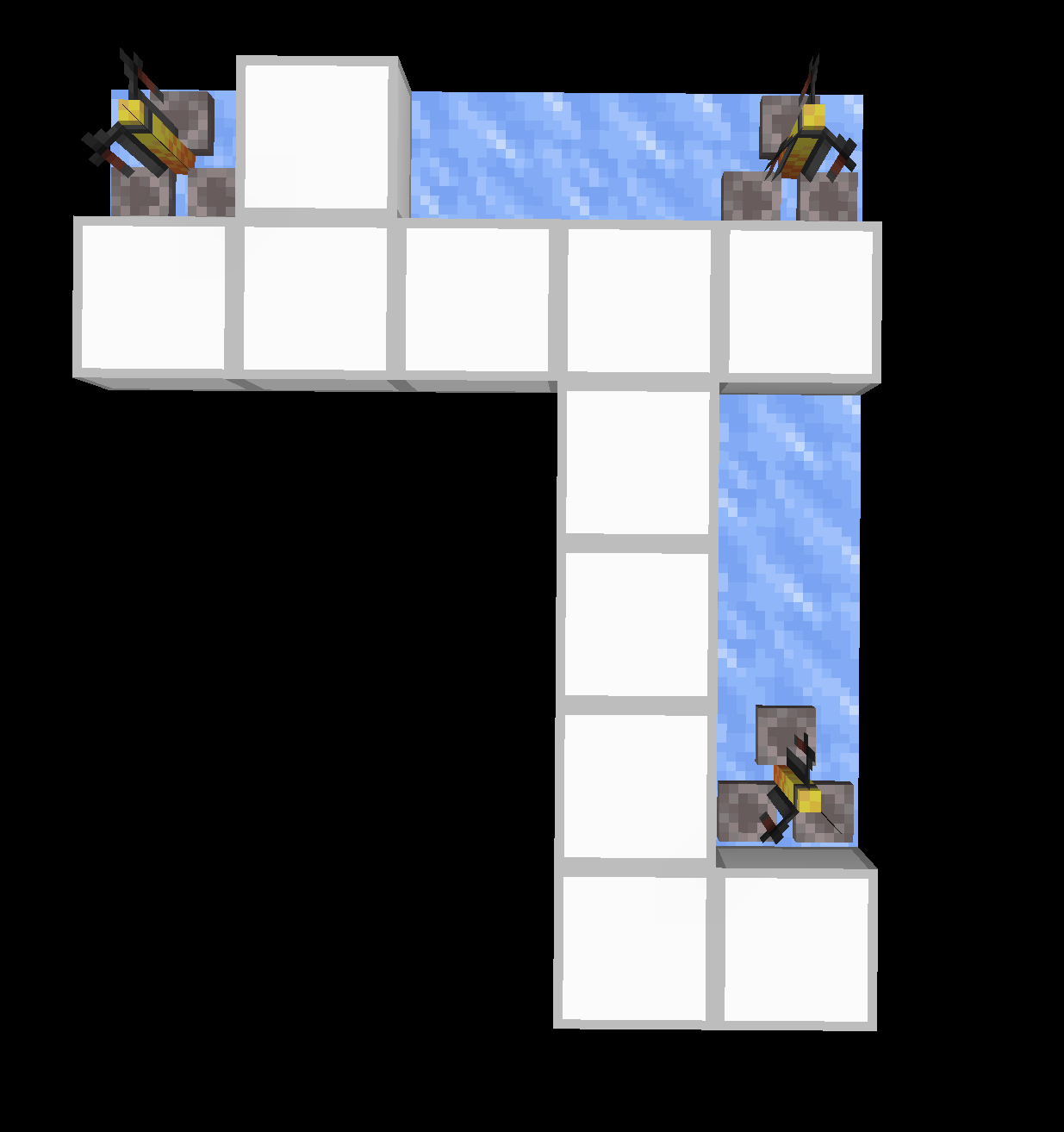
Sometimes (often in the nether) you may need to move items without the use of water. For this, you may use some special block properties. Brewing Stands and Stairs give impulses to items that enter the block they are placed in. The direction of this impulse can be controlled by covering certain sides of the stair or brewing stand. Specific alignments and ice allow you to move items along a line, similar to moving them with water. Below is an example of a brewing stand item stream. To enter the stream, throw/dispense items into the face of the honey facing the brewing stand and let them fall onto the stand. This will send them moving to the right towards the next brewing stand, which repeats the impulse. Hoppers may be placed below the slabs to collect items moving through the stream.
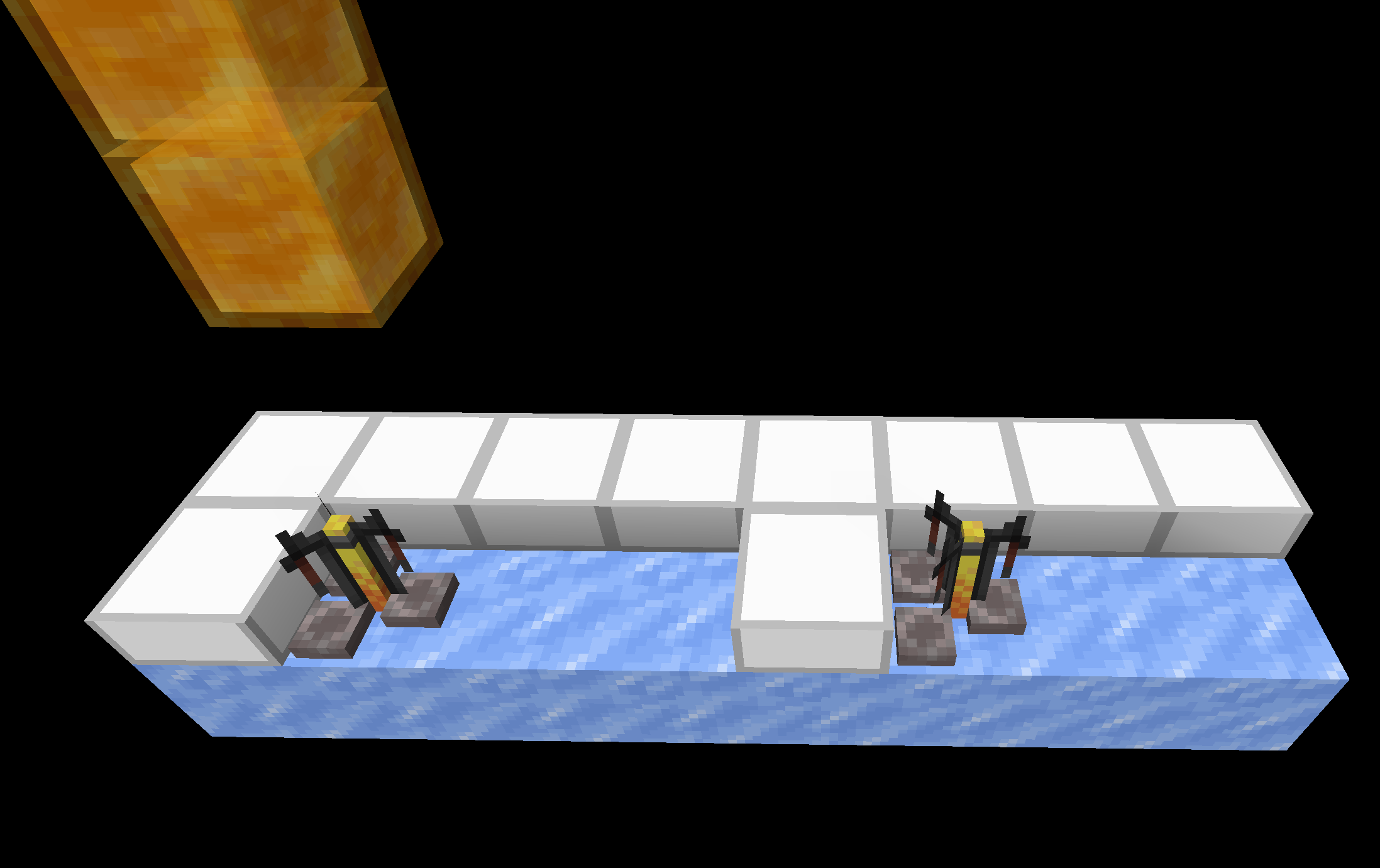
Turns become signifigantly more complicated with brewing stand streams. Making turns crossing the full length of the turning brewing stand is not feesable, so brewing stand streams are best used to consolidate many points into one. Below is an example of a turn, where item flow starts from the bottom and turns left to end a the top left.
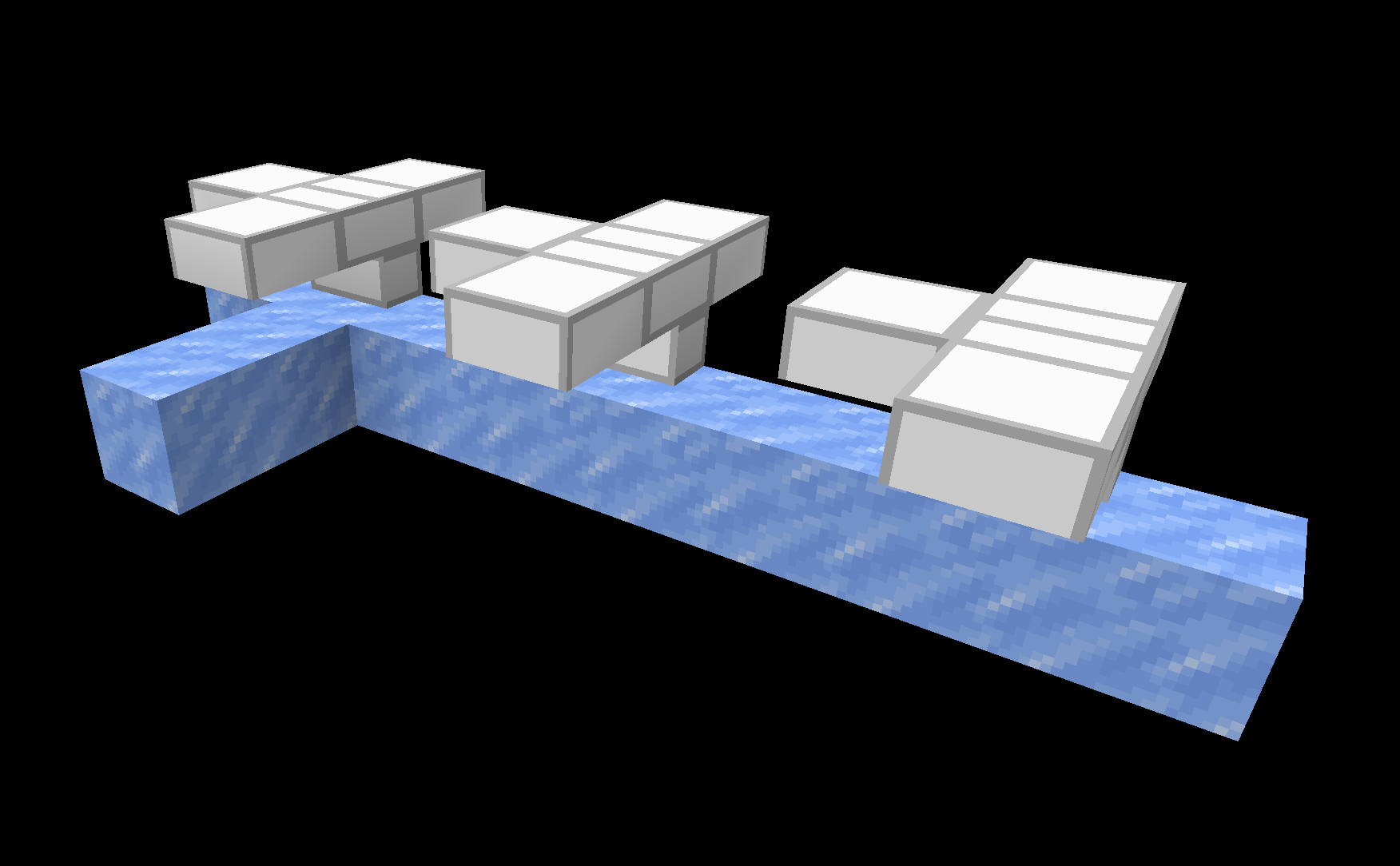
Stair based waterless item streams are cheaper, more lag efficient and much more flexible with input and turns, but are far slower and more difficult to build than brewing stand streams and cannot transport above hoppers. Below is an example of a stair item stream, where items are input from the left and exit the right side.
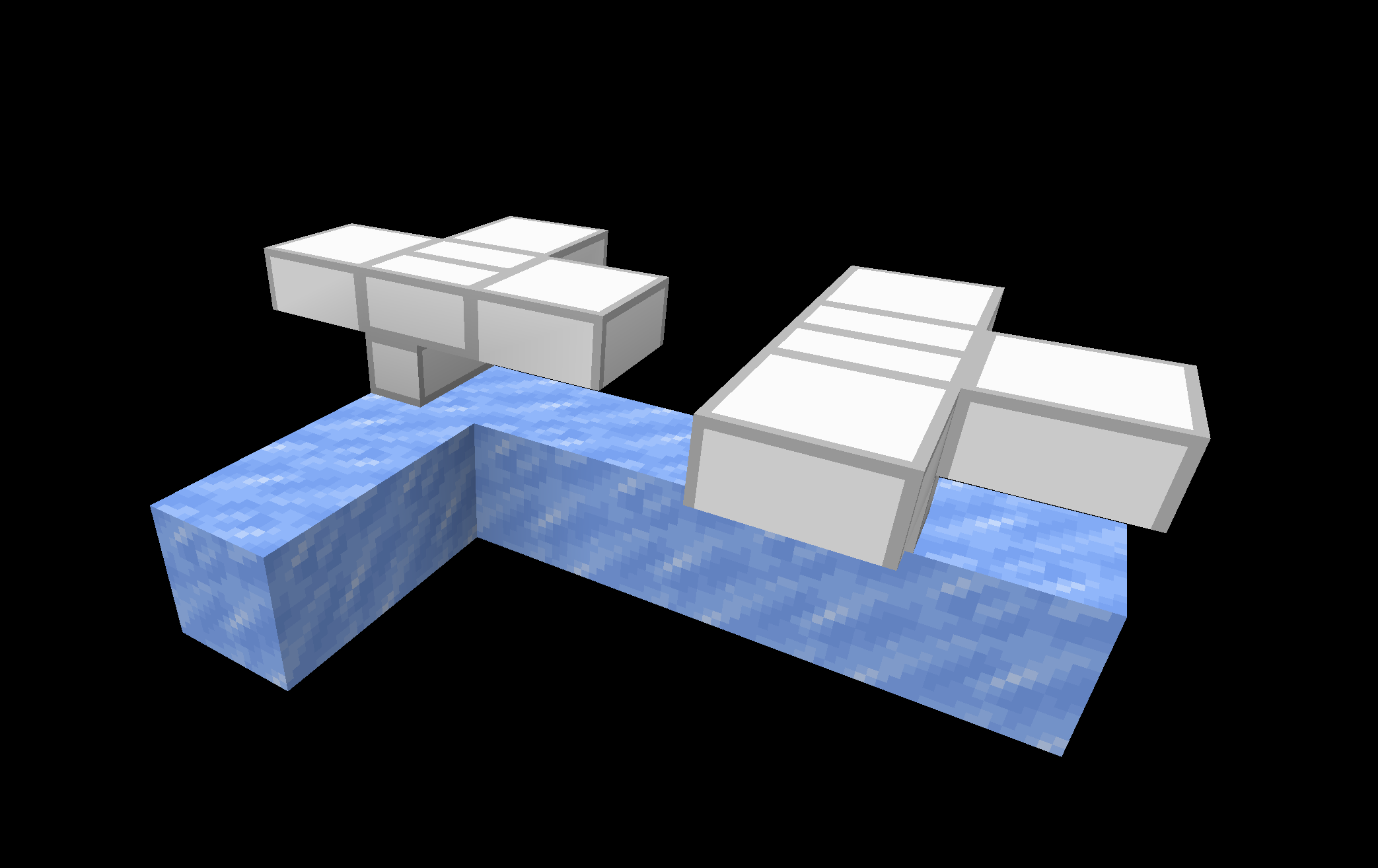
Below is an example of a turn with stair streams. Note the slab is missing on the side where you want the items to move towards.
Item Sorting
Stackable Sorting
Stackable item sorters separate items by type are the very base of of storage tech. Nearly every storage tech contraption uses an item filter or a variation on the concept.
How Item Filters Work
Most item filters utilize the property of items that only allows them to stack with items of the same item type and name. Hoppers are the main method for checking this. To sort a single item type, each slot of a hopper must be filled, as to only allow the item that will be sorted into the hopper. The last 4 slots are filled with a different item type/name. These are called "filler items". It is recommended that the filler items be named in an anvil to avoid accidental interference. The first slot contains the item that should be filtered.
For example, the following image shows the inventory of a filter hopper that will sort sticks. Note that the barrier items can be replaced with any other item.

A second hopper is placed beneath the filter hopper. The filter hopper cannot face into any other inventories as it is always unlocked. The hopper below it however is locked by default. This second hopper is used to remove any new items that enter the filter hopper. If an item enters the filter hopper, it means that the item type matches what is being sorted.
To know if an item has entered the hopper, a comparator is used to read the inventory fill level of the filter hopper. The hopper is filled in a way that if a single new item enters the filter hopper, the signal strength from the comparator will increase. This is used to unlock the second hopper and remove any new items until the item count is dropped below the threshold to lock the second hopper again.
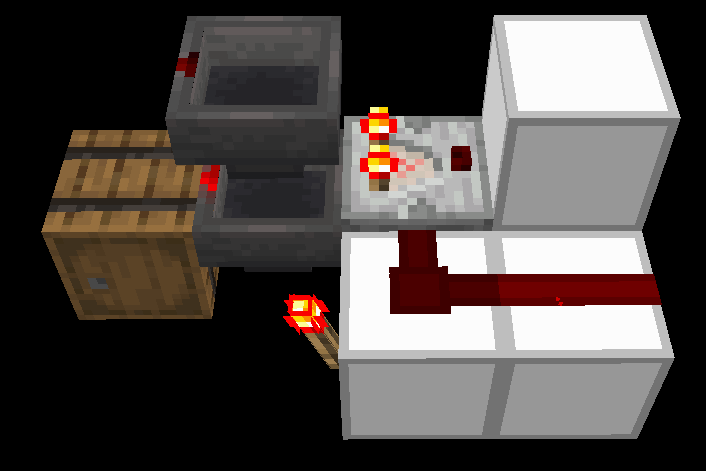 The absolute simplest and cheapest item filter possible. The hopper on the top contains the inventory shown above.
Although the above filter is very cheap, it has some issues. Namely that it is not compact. The design cannot be repeated in a compact manner. The following filters are a solution to this.
Variations on the Item Filter
Signal Strength 3 Item Filters
The easiest way to make a compact. repeatable and overflow-proof (will not break if its output inventory is full) item filter is to use signal strength 3 (SS3) filters. These filters are named after the signal strength threshold they must meet to move items. To enter signal strength 3, a hopper requires at least 46 (64 stackable) items inside its inventory. Because of this, SS3 filters top hoppers have a different prefill than other filter types.
 The filter hopper inventory on an overflow-proof SS3 item filter.
The following two images are common versions of SS3 filters.
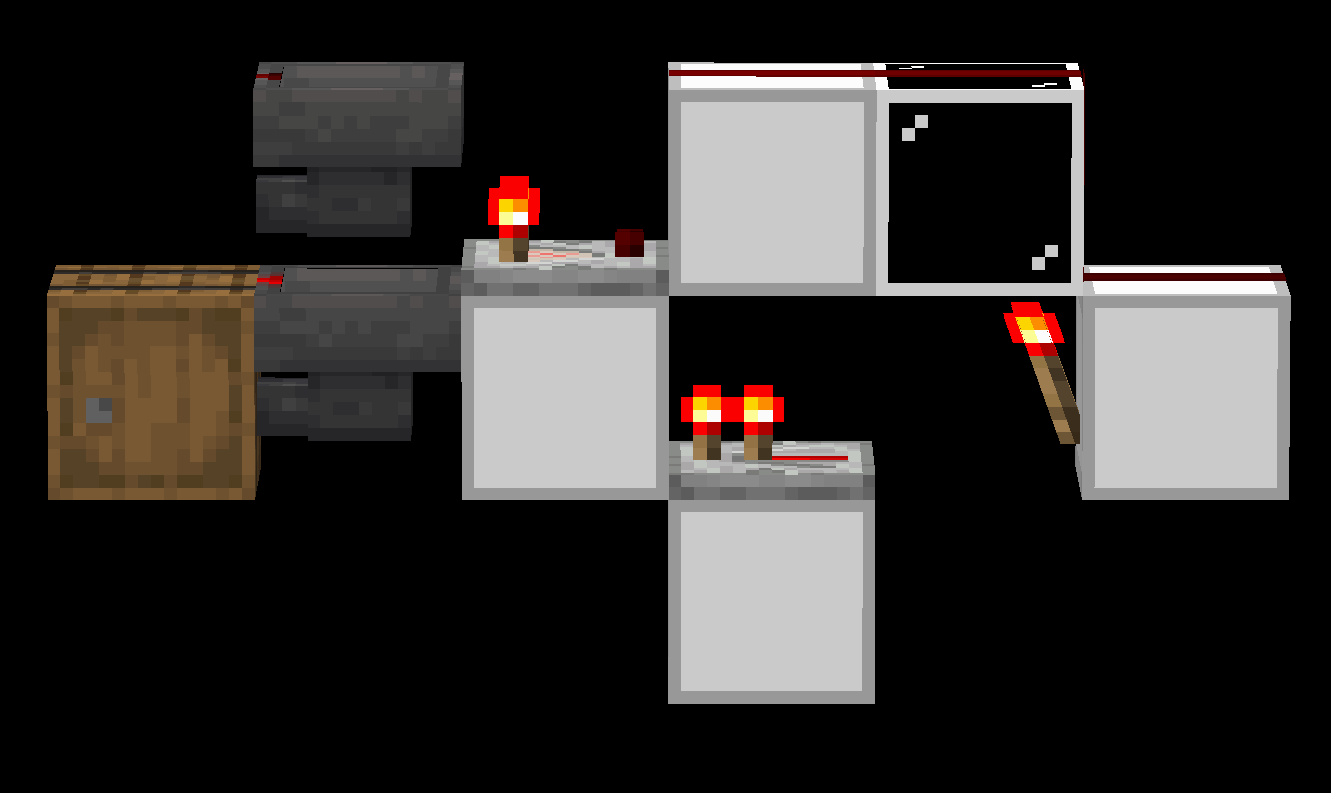 The TechRock filter.
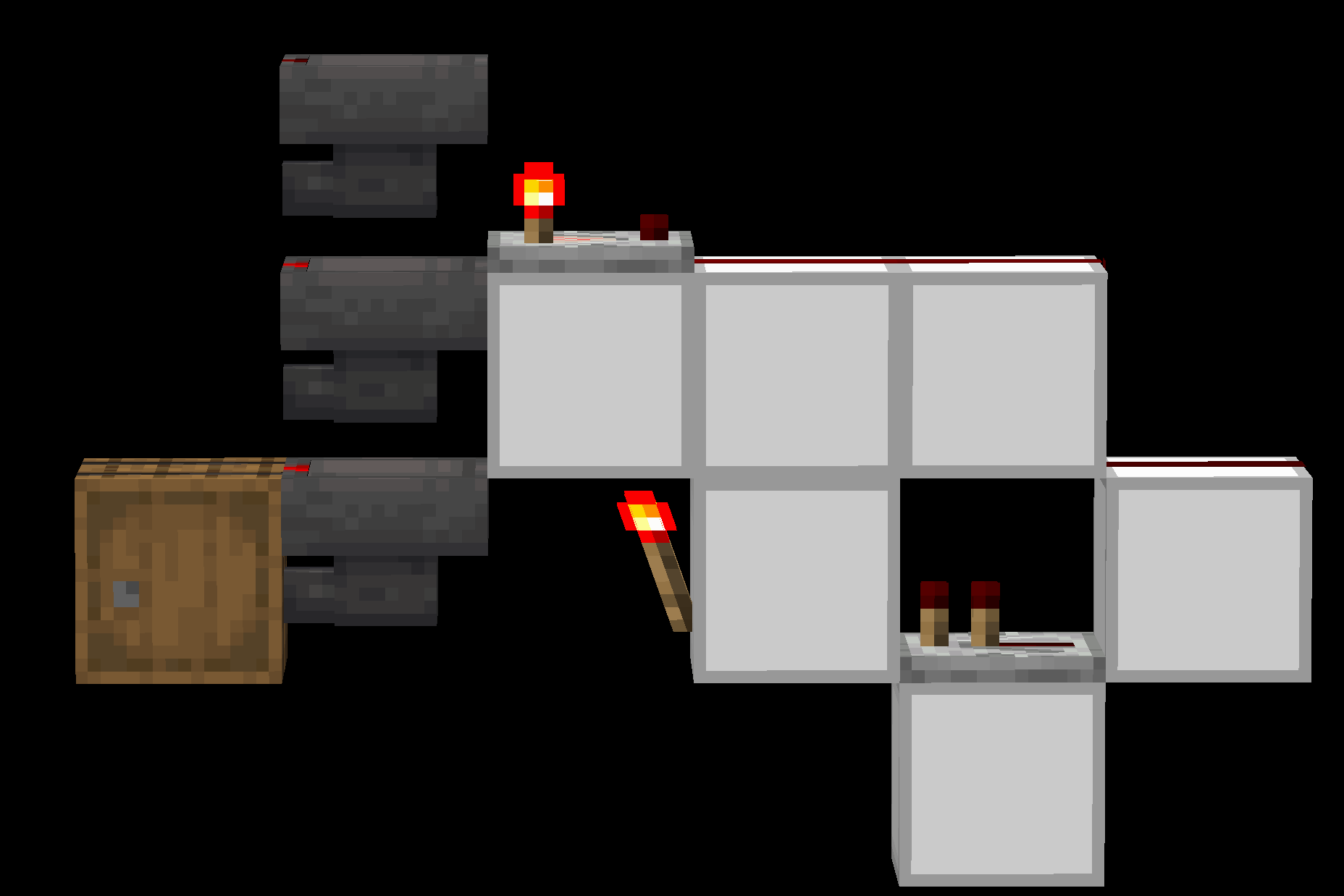 The ImpulseSV Item Filter.
The above filters are versatile and easy to use because of their ease of tiling. As long as the filter hopper prefill is done correctly, they can be placed directly next to each other without any interference.
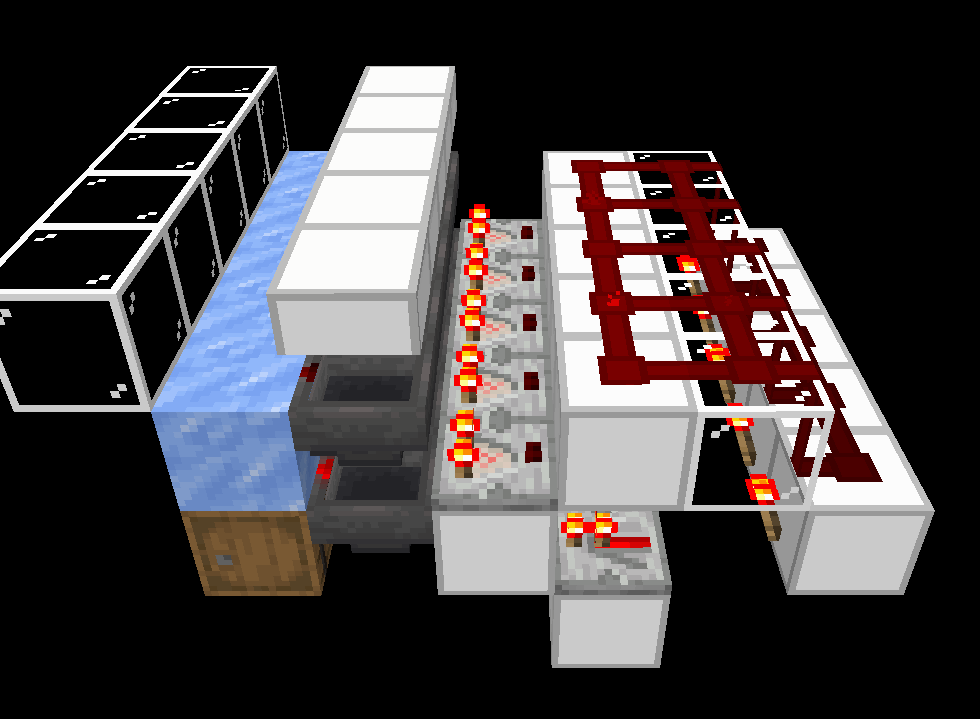 5 TechRock item filters tiled. All 5 slices work independently of the others.
Double Hopper Speed Item Filters
A major limitation of the basic item filter is speed. A single hopper can only move 2.5 items per second. This is refered to as Hopper Speed, or HS for short. A single hopper is 1xHS (one times hopper speed) or 9,000 per hour. Despite how fast 9,000 items per hour sounds, many farm exceed this number easily. To avoid needing more filters, it is possible to speed up the rate that a single filter can move items. It is usually easiest to speed up a filter to double the rate of a single hopper by having the filter hopper push items at the same time the second hopper is pulling from them. Note that these 2xHS filters are not practical for main storage systems and are best used as sorting in farm outputs.
The following images are common versions of 2xHS item filters. Special prefill is marked as required per hopper. The output is split into 2 different 1xHS streams.
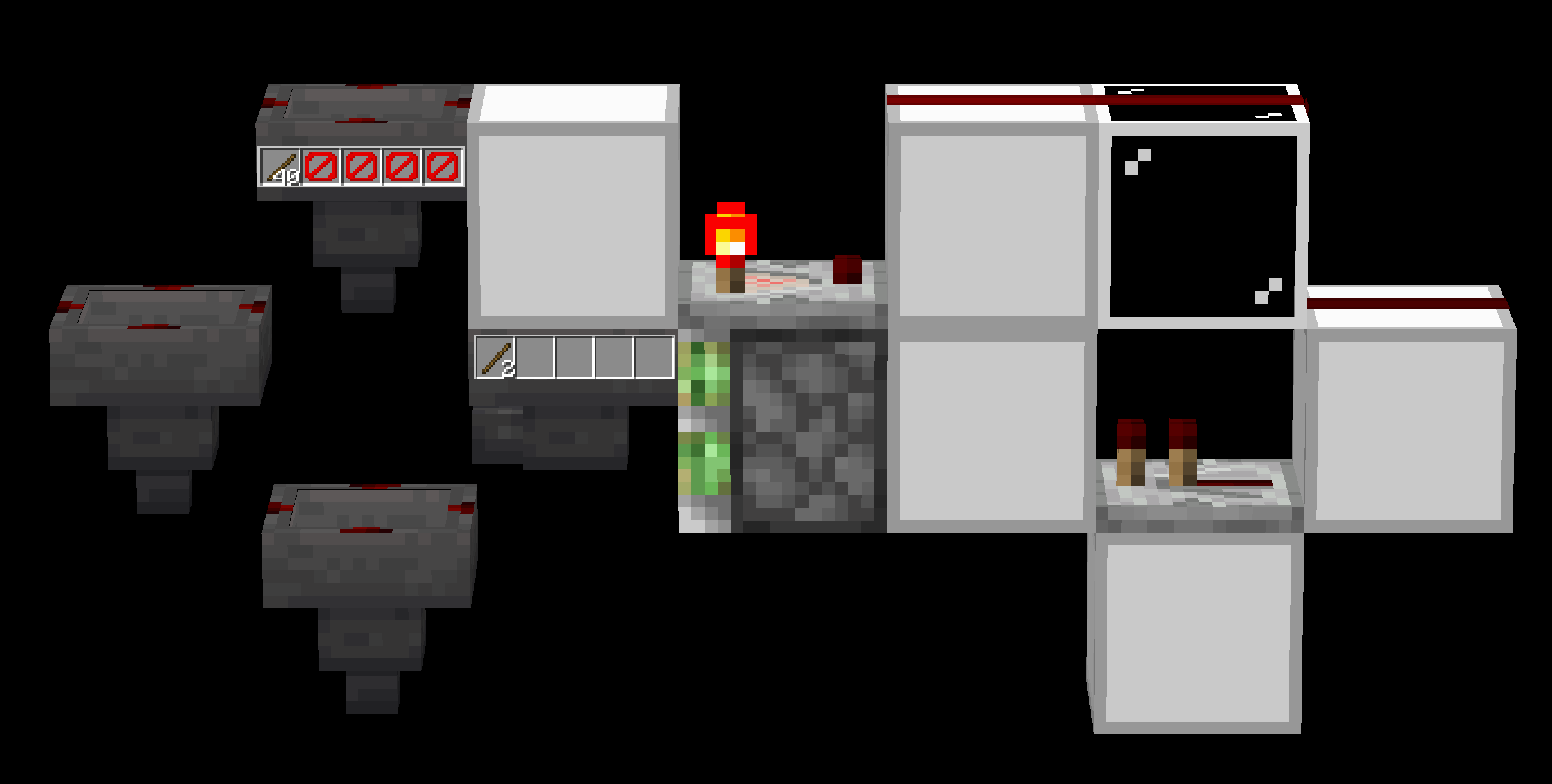 Piston-based 2xHS item filter. Trading low prefill for a piston.
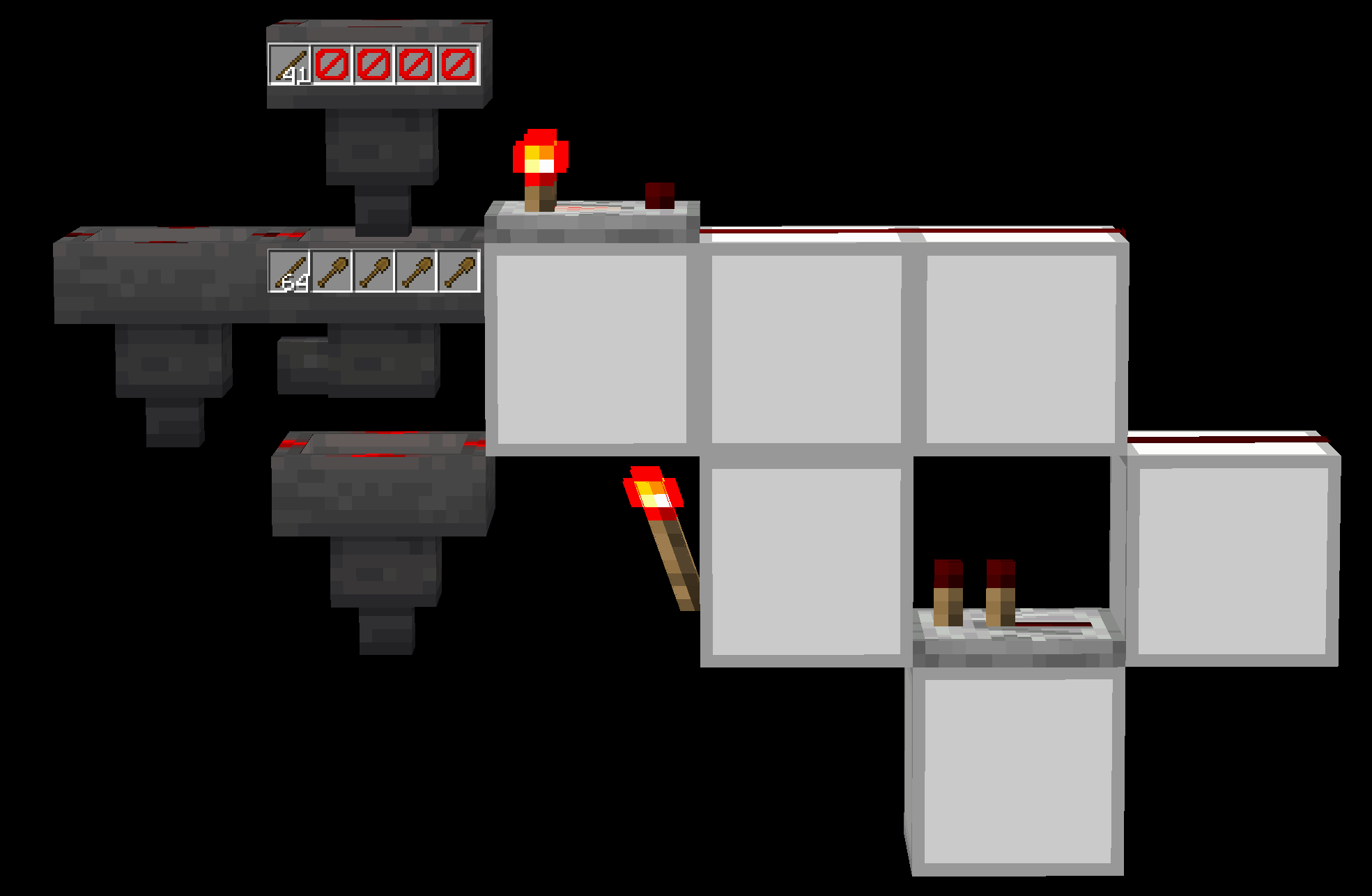
A variation on the ImpulseSV filter, works at 2xHS. Note that the shovels may be replaced with named items, as long as they are a different name than the filler items in the filter hopper.
Signal Strength Independence
A major weakness of the simple ImpulseSV or TechRock item filters is the amount of the sorted item that needs to be held inside the filter hopper. Not only is this expensive, it also limits the amount of items that the filter can pick up at once.
A common first idea is to increase the amount of filler items in the filter hopper so that less sorted items are needed. This works in theory for solving our problem, but it also increases the maximum amount of items that can be in the hopper at once. This number is outside the range for signal strength 3 output, so the filter reads signal strength 4. Due to the method for tiling these filters, the adjacent filters will also activate, causing them to lose their prefill.
To combat this, the concept of Signal Strength Independence (SSI) was developed. As the name states, it separates the signal for each filter so that if the filter hopper contains an amount of items beyond the range for its desired signal strength, adjacent filters will not break.
The inventory of a SSI filter hopper
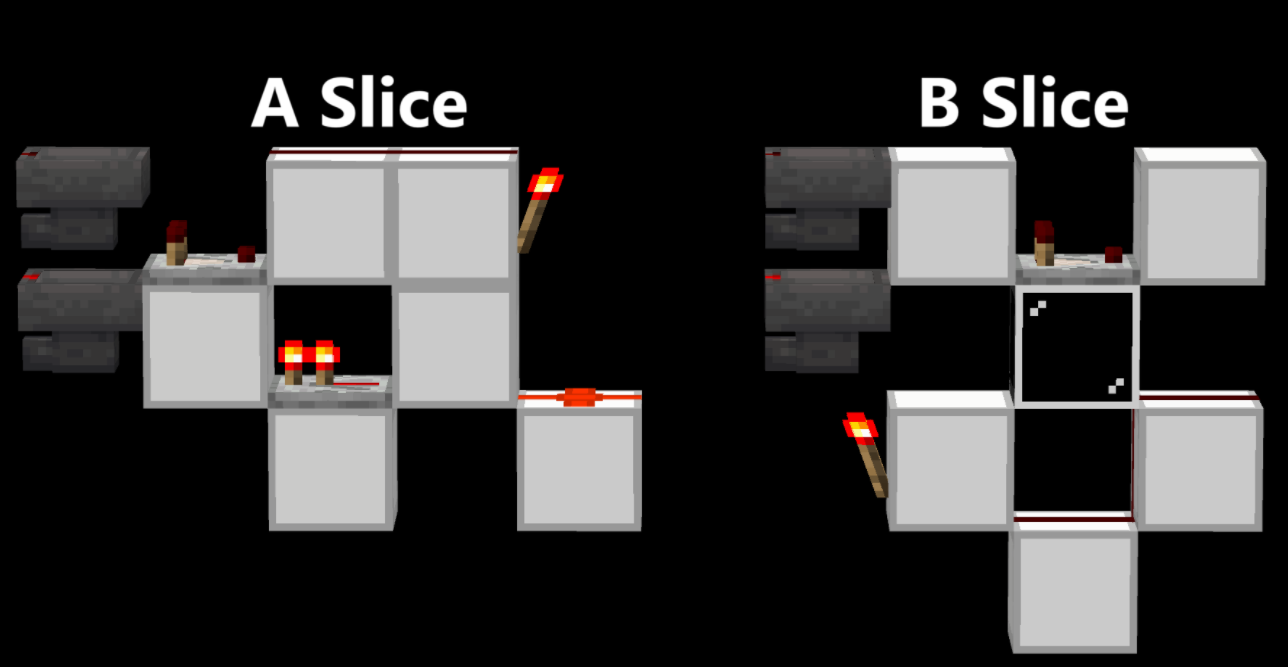
However, this idea is not as simple as it sounds to implement. Due to the nature of redstone dust, it is impossible for SSI filters to be one-wide-tileable with every slice remaining the same. SSI filters are always one-wide-AB-tilable, where every other slice changes.
Below is an example of SSI filters. There are too many versions of these filters to include them all here.
Nonstackable Separators
Many contraptions require that nonstackable items be split from the stackables, such as as universal storage inputs and farm storages.
Most nonstackable separators use the property of nonstackables that a comparator sees a slot with a nonstackable to be the same as a stack (64) of stackables.
Due to this, a single nonstackable item inside a dropper will cause a comparator reading it to output a signal strength of 2. Similarly, a hopper with a single nonstackable item will cause a comparator reading it to output a signal strength of 3.

A nonstackable separator using signal strength and droppers. The diamond represents any 64 or 16 stackable.
Sixteen-Stackable Separators
Block Property-Based Nonstackable Sorting
Although Nonstackable items cannot be sorted by conventional means, there are several items that have consistent sorting methods.
The simplest nonstackackable sorters use properties of blocks to whitelist or blacklist certain item types. To sort, items are attempted to be placed in an inventory, and if the item actually enters the inventory, then it is sorted (with the exception of shulker boxes, which are the inversion of this).
The following is a list of blocks with whitelisting properties, along with the items they can sort using it.
Chiseled Bookshelf - Enchanted books, written books, books (note that written books are 16 stackable and books are 64 stackable)
Brewing stand - Potions, water bottles
Jukebox - discs (individual discs can be sorted using their signal strength when played in a jukebox)
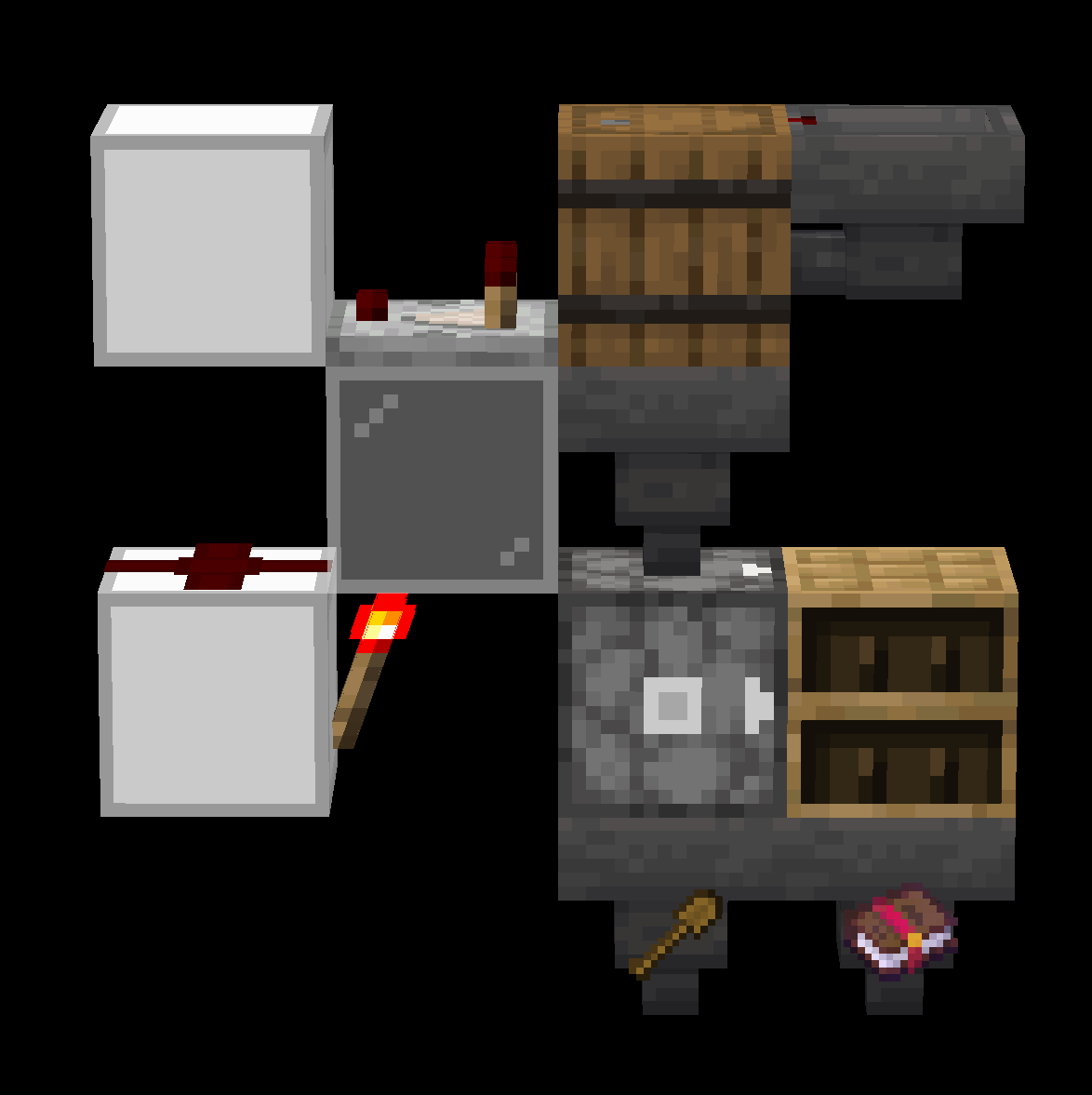 An Enchanted Book sorter using a chiseled bookshelf.
Note that the bookshelf may be replaced with any of the above blocks.
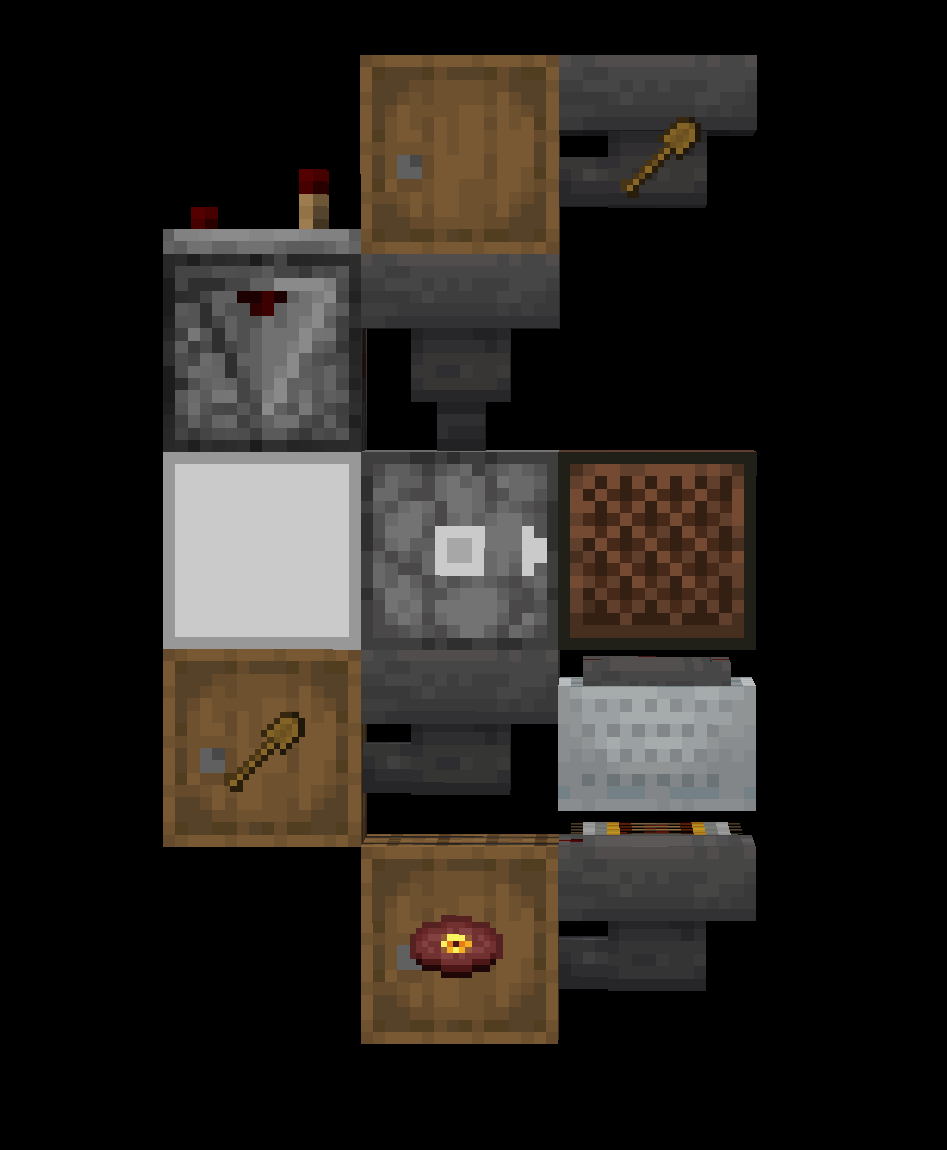
The slightly different setup required for disc sorting.
There is only only one block that has blacklisting properties: shulker boxes. These can be sorted by utilizing the fact that any item besides shulker boxes can be placed into a shulker box.
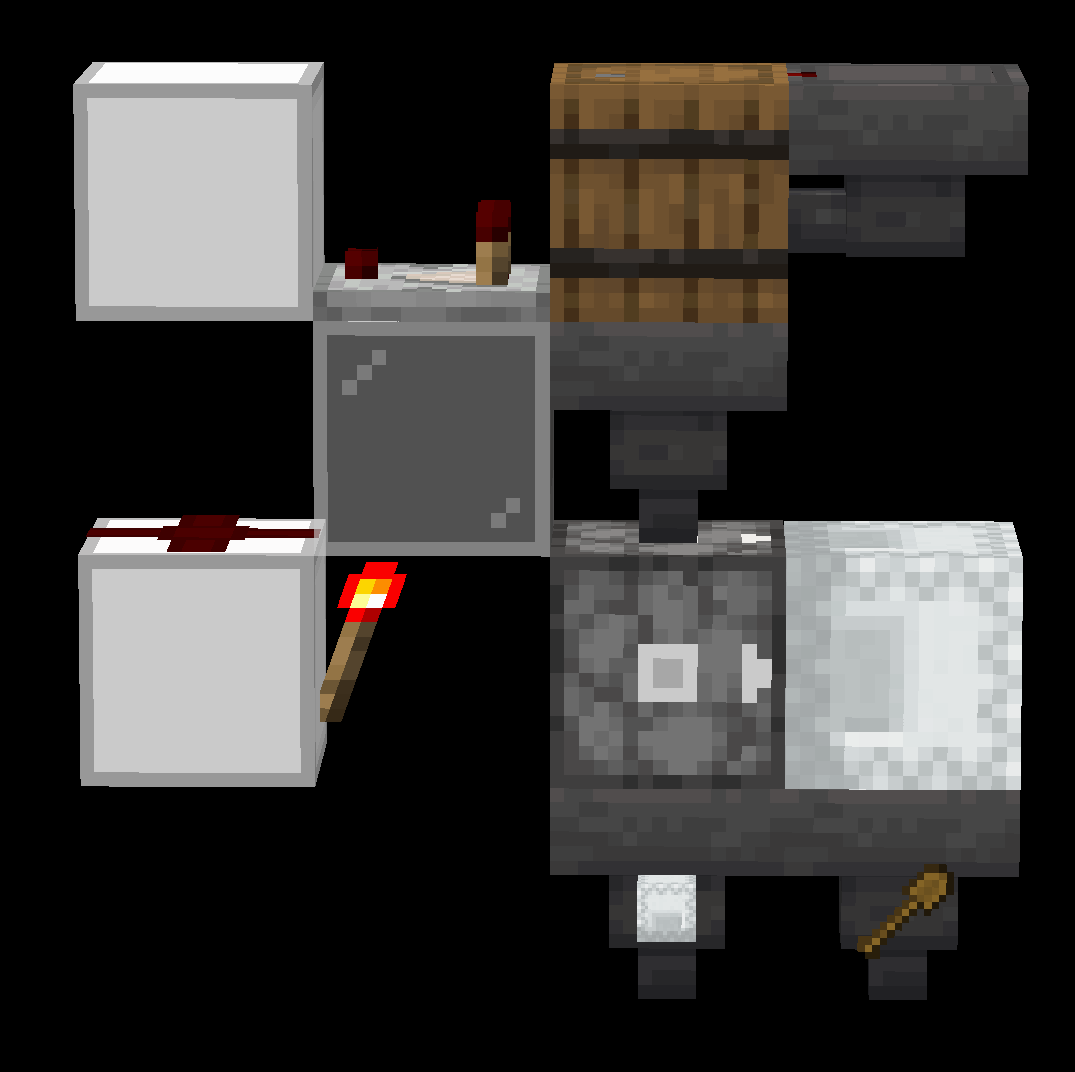
A Shulker Box sorter using the shulker box's blacklisting property.
Dispenser/Item-Property Based Nonstackable Sorting
The most versatile method of sorting Nonstackables by item-type is using dispensers. This is because dispensers have special interactions with a certain list of items.
The following is a list of all items that interact with dispensers in a unique way, as well as their method for sorting using that property
Note: this list is shown the order that items are typically sorted through in a Nonstackable Sorting System (NSS). Each sorter may not work if all previous item types have not been removed.
Shears/Brushes/Flint & Steel:
Shears are used by dispensers to interact with shearable mobs, such as sheep, bogged, and mooshrooms. Brushes are used to a similar effect on armadillos for their scutes. Because of this interaction, a dispenser will never shoot out shears or brushes from its inventory. These items can be sorted as shown below by firing a dispenser into a honey block as the item enters the dispenser. Shears and brushes will be left behind in the dispenser and move down into the hopper on the left, while other items will be shot into the honey block to be picked up by the hopper on the right. Note the honey block is not required, but it stops usage of durability on the sorted items, and allows the system to accept liquid buckets.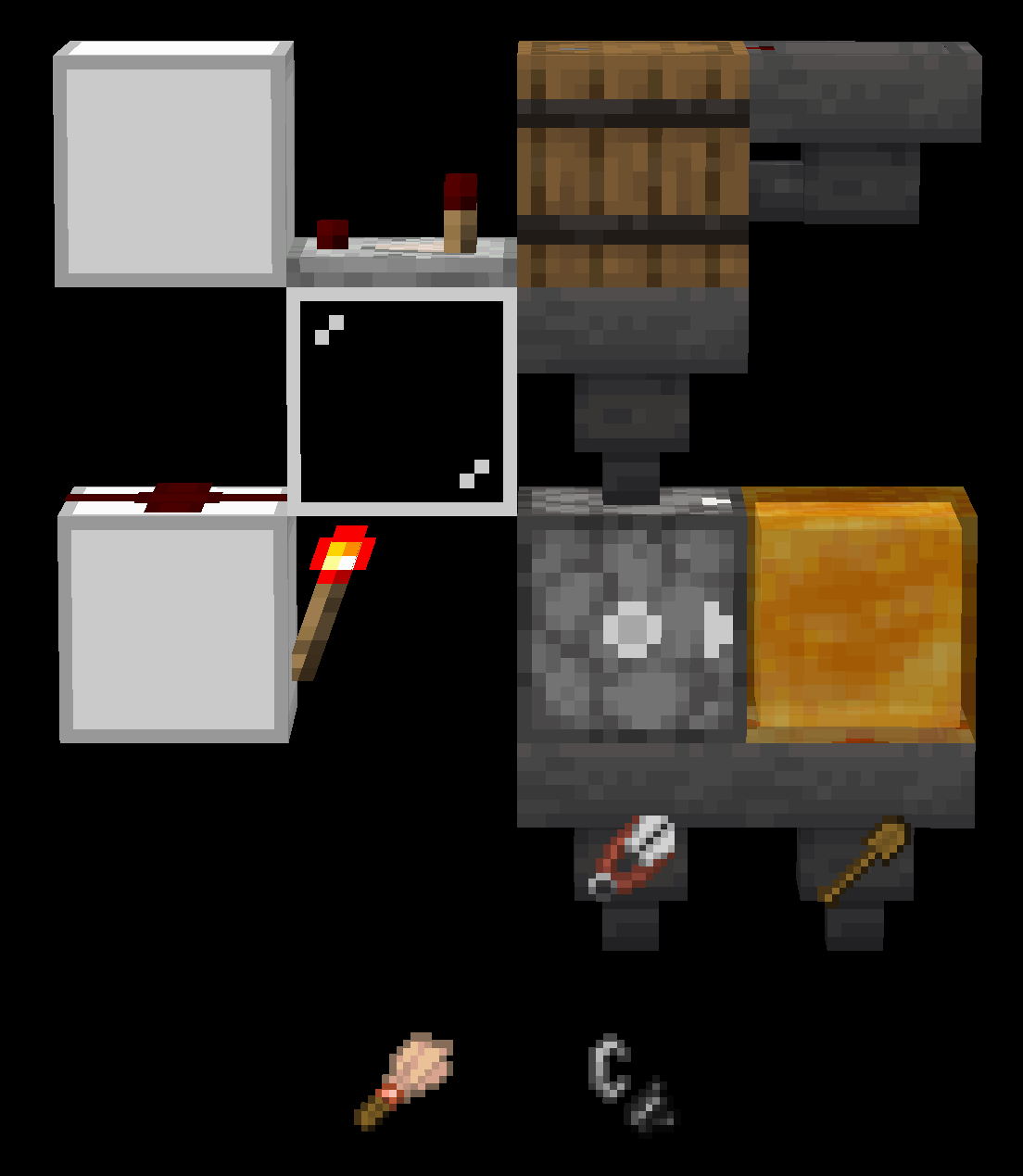 A shears, Brush, and Flint & Steel separator.
These 3 items can be further differentiated using their own special properties.
Flint & Steel:
Flint and steel can be sorted using its ability to start fires with dispensers. As shown below, an observer detects the attempt to make a fire by the dispenser and unlocks a hopper below to remove any detected flint and steel. Note that this uses a durability point of the flint & steel. 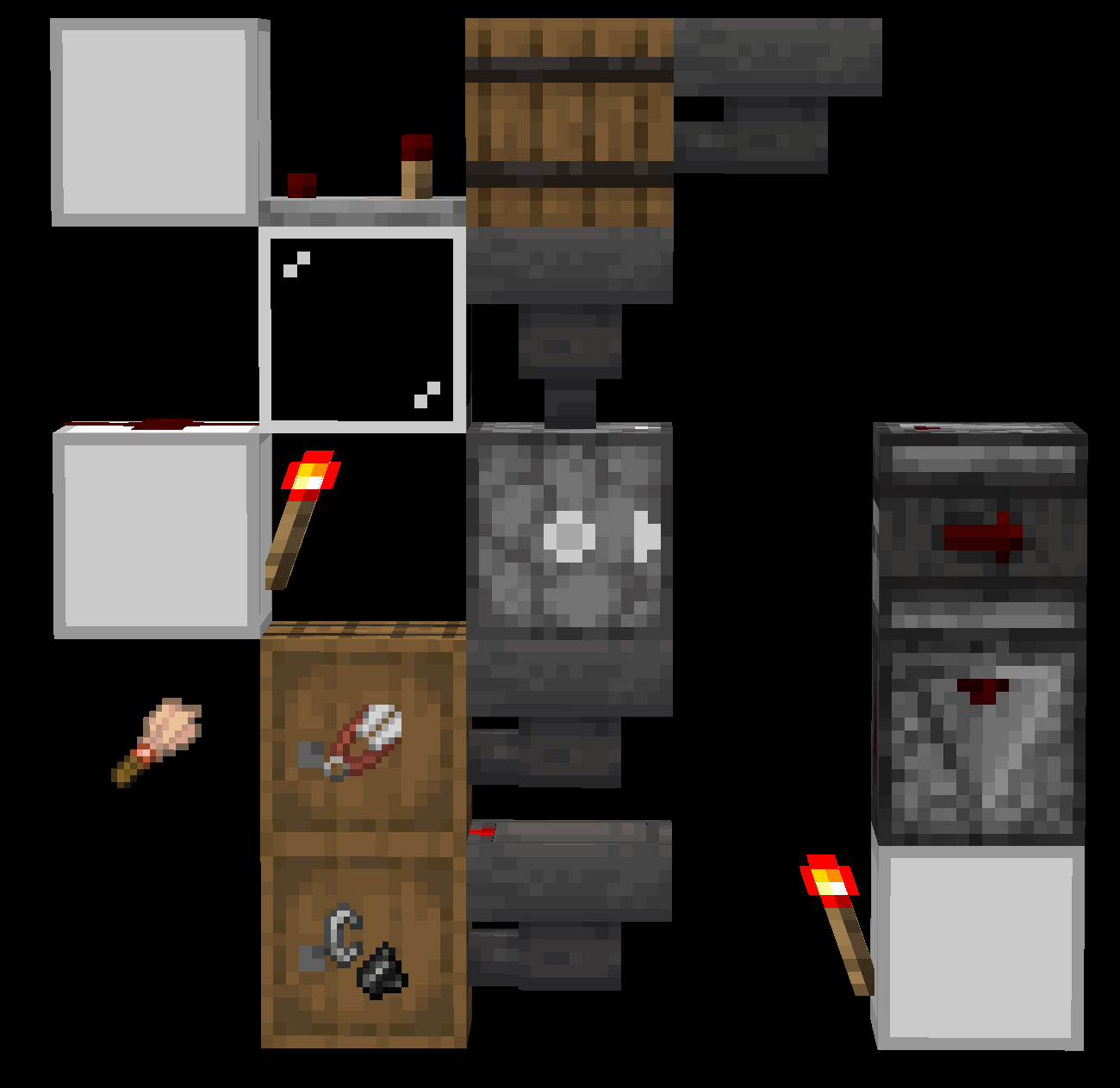 A Flint & Steel sorter
Copper Brush:
Brushes are not typically sorted from shears in a storage, but they can be sorted using their interaction with armadillos. The item from brushing an armadillo spawns in a predictable location, so it can be detected and used to allow only brushes through. This is not usually done as it uses a large portion of the brush's durability.
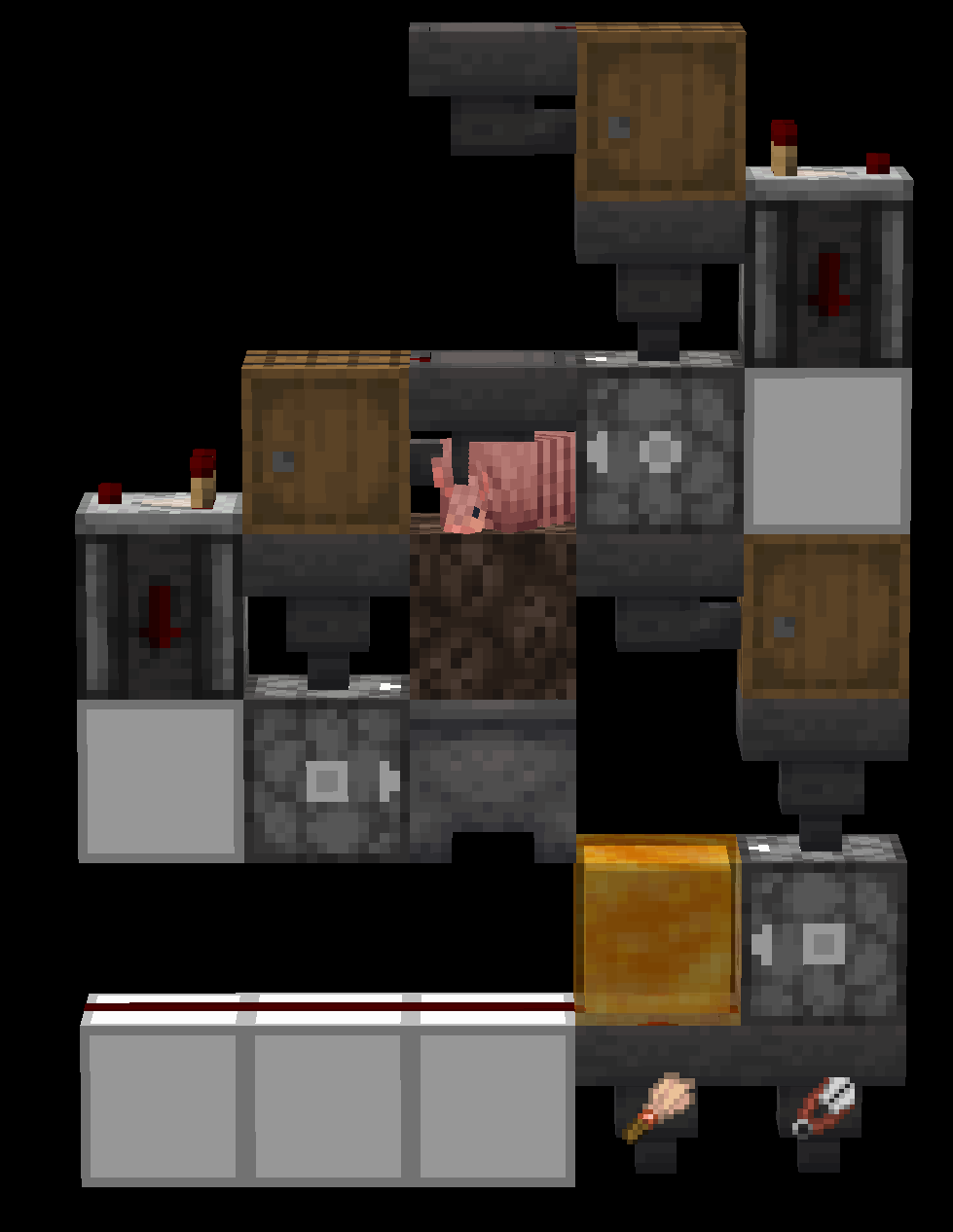 Brush Sorter by FireBee
Shears:
In a practical NSS, shears are not sorted using any specific mathod, instead by removing flint & steel and brushes from the stream. However, it is possible to sort shears only by using the same method as brushes but with a sheep instead. This is impractical because of its speed.
Bucket of Water/Powdered Snow/Lava:
Buckets with liquid will not be shot out by a dispenser but their liquids will be placed in air, leaving an empty bucket inside the dispenser's inventory. The liquid can also be picked back up by the dispenser, so firing the dispenser twice will shoot out any non-liquid items and leave the bucket with liquid inside the dispenser to be removed by a hopper.
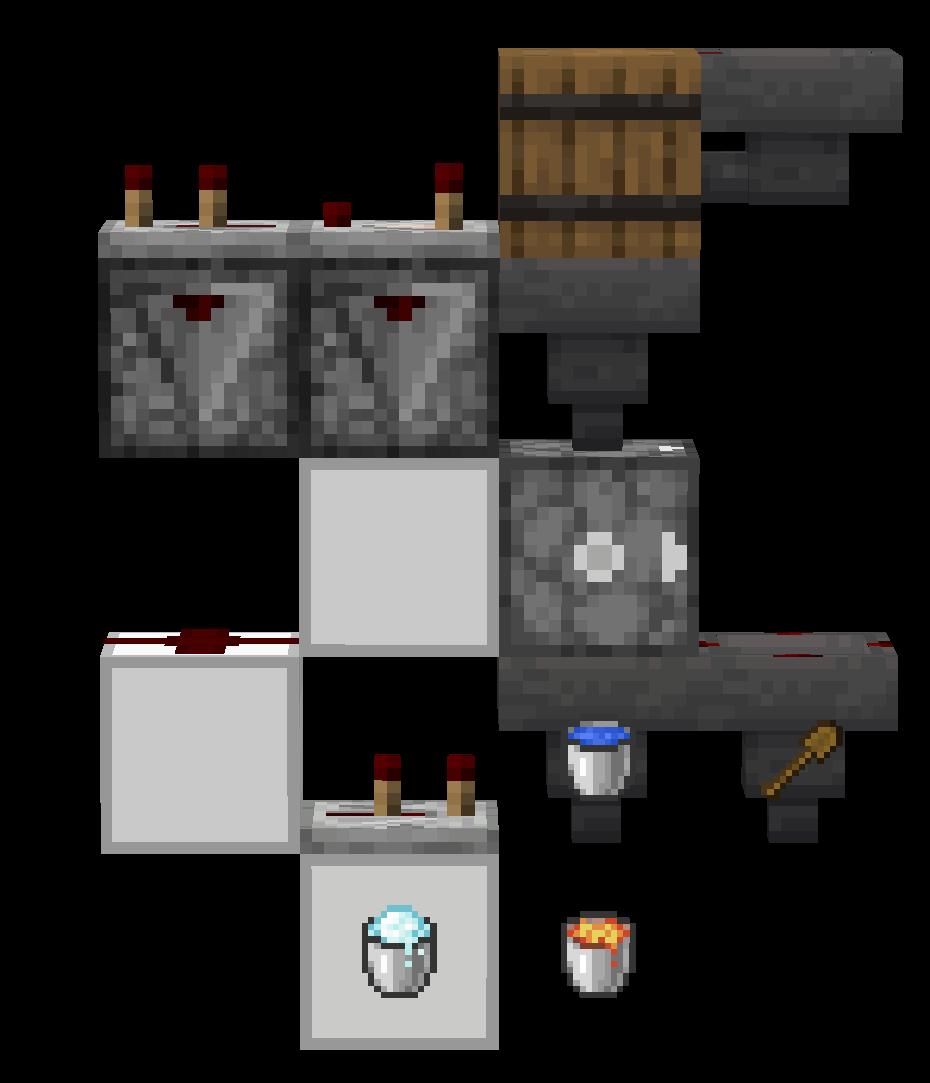 A liquid separator.
The 3 sortable liquid buckets can also be differentiated using their unique liquid properties.
Bucket of Water:
Water is the only fluid that can occupy the same space as another block (with the exception of powdered snow and vines due to a bug). To sort water, use the previously explained method of double-pulsing a dispenser, but face it into a slab, stair, or other waterloggable block that cannot be destroyed by lava. Powdered snow and lava will shoot out into the slab while water will be placed and picked back up, remaining in the dispenser.
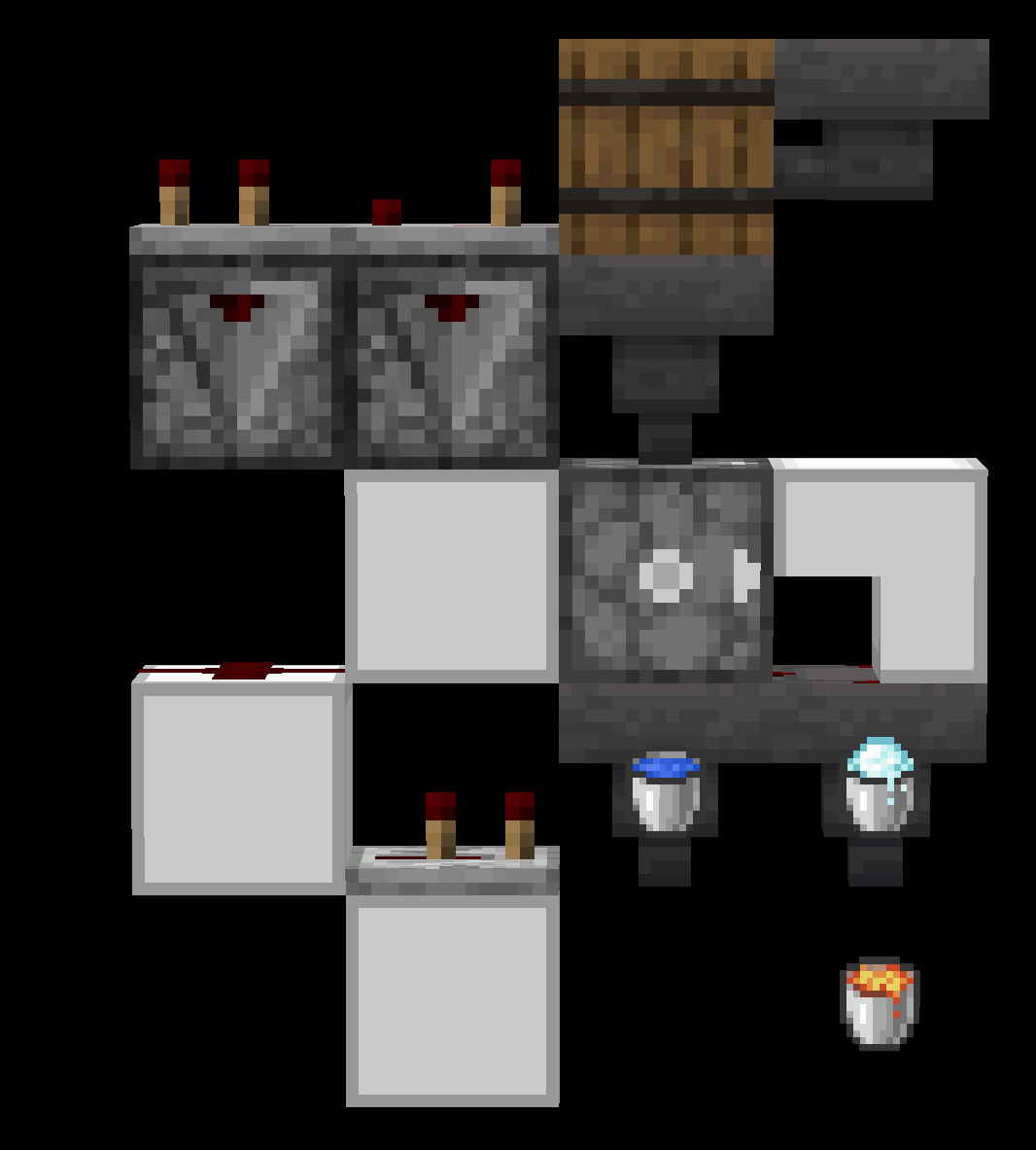 A Water Bucket sorter.
Bucket of Powdered Snow:
Powdered snow can be sorted from lava using the fact that it is a block and movable by pistons. A typical powdered snow sorter will place the liquid on top of obsidian and attempt to activate a piston with a slime block touching the liquid facing downwards. If the liquid is water or lava, the piston will be able to move, as there is nothing in the way of its movement. If the liquid is powdered snow, it will attach to the slime and stop the piston from moving. Detecting when this happens allows the sorting of powdered snow from other liquids.
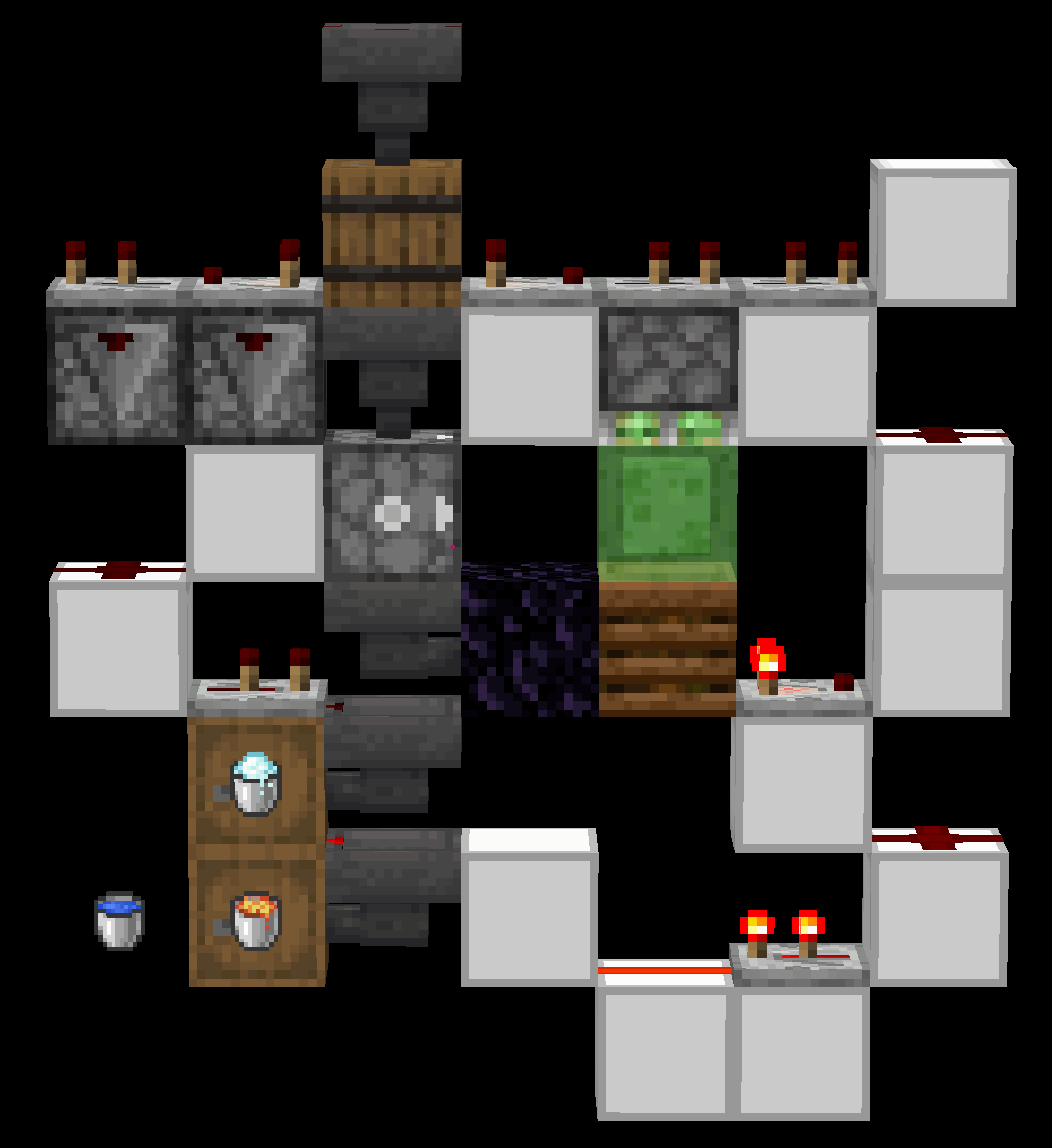 A Powdered Snow sorter.
Bucket of Lava:
Lava is not sorted by property, and is instead sorted by default after all other liquids are sorted. However, it is possible to sort lava by flow speed or sponges, but this is impractical.
Boat/Chest Boat:
Boats and chest boats can be placed on water with dispensers. To sort boats and chest boats, face the dispenser into water with a hopper below it. Any non-boat items will be shot out and picked up by the hopper. Placed boats can be broken by fire, lava, or cactus and picked up with a hopper. Note that the dropped boat item tends towards the south.
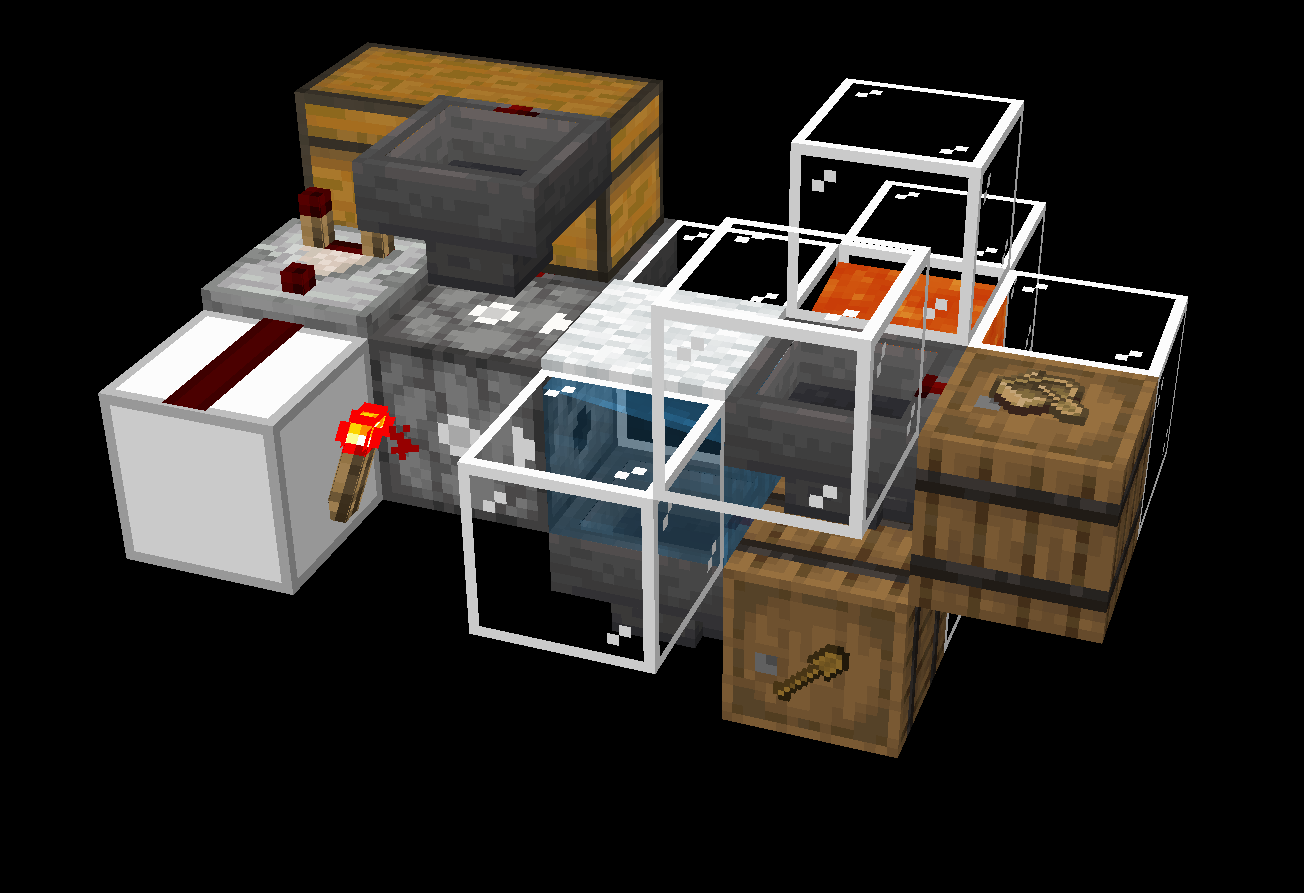
Boat and Chest Boat separator
Chest boats can also be sorted from boats.
Chest Boat:
Chest boats have an inventory, so hoppers or droppers are able to place an item into them. The item leaving the hopper or dropper can be detected and used to sort chest boats from boats.
Minecart/Chest Minecart/Hopper Minecart/TNT Minecart:
Dispensers can place minecarts into rails. Non-minecart items are shot out. The placed minecarts can be broken by cactus, fire, or lava and picked up as items.
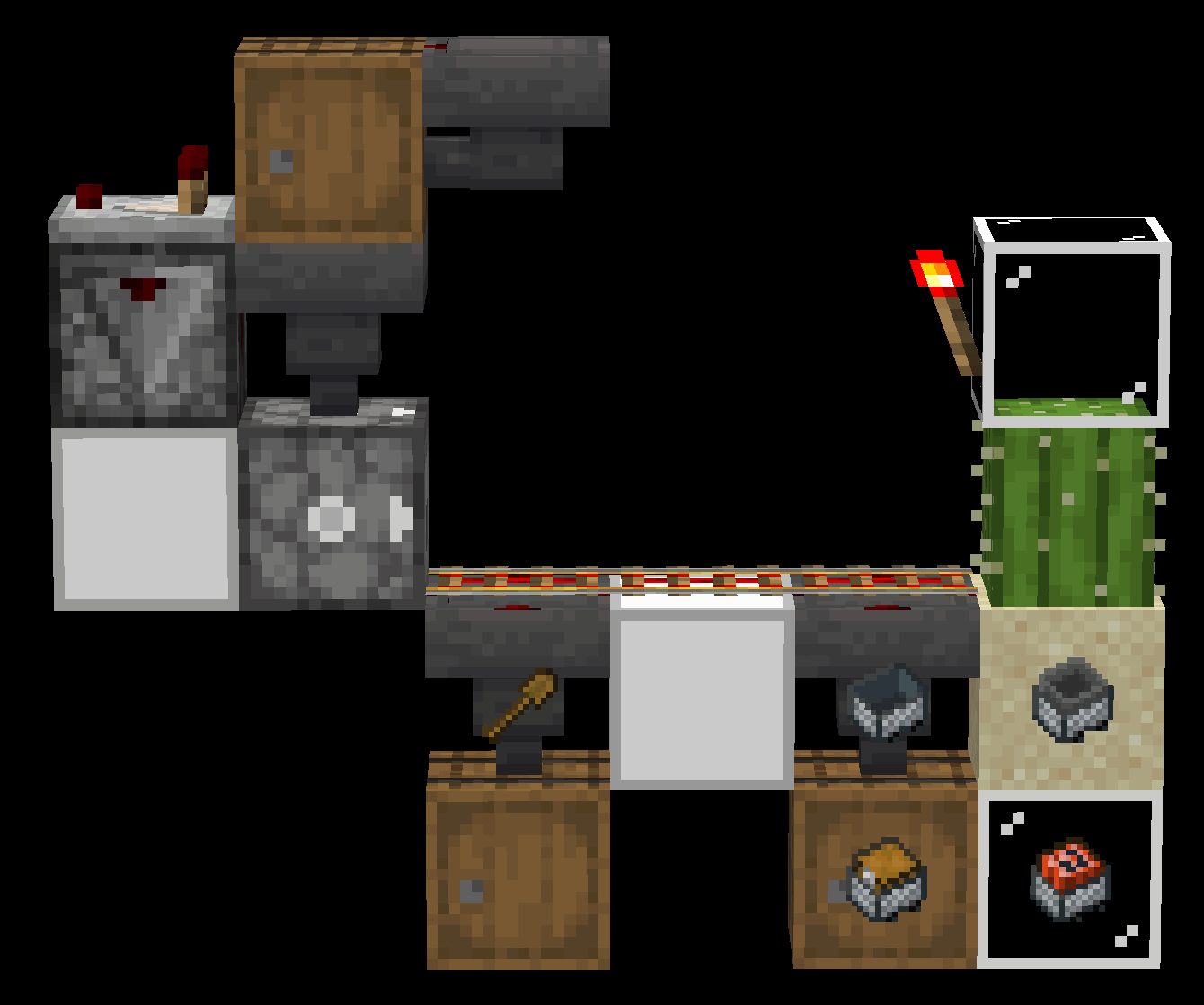 A minecart separator
The four minecart types can also be separated by their properties. There are multiple methods of sorting each minecart.
Minecart:
Regular ridable minecarts will automatically pick up entities they run into, including armor stands. This can be detected by a pressure plate and the minecart can be diverted with a curved rail. Activator rails will kick the entity back onto the pressure plate.
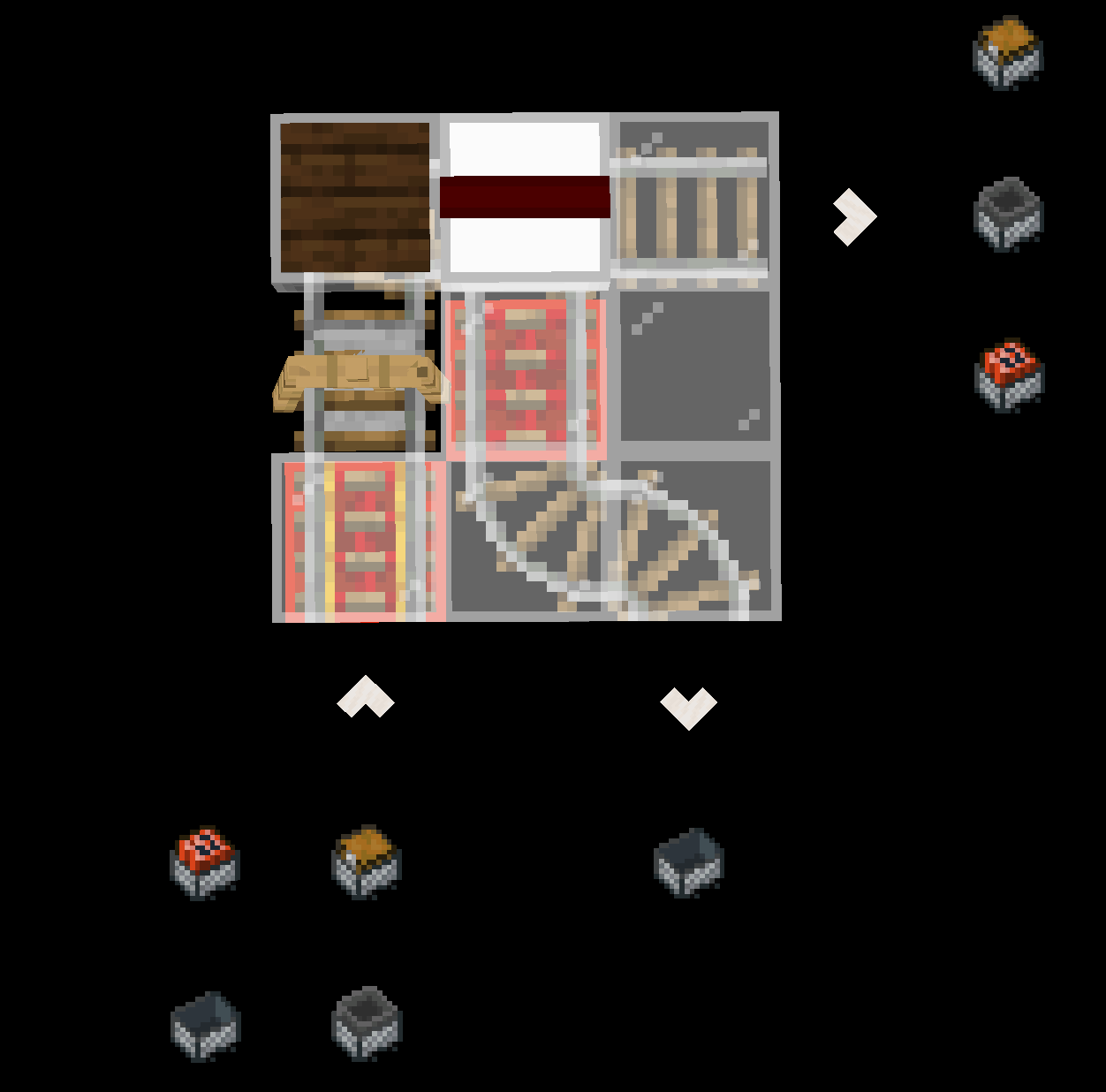 The setup to sort ridable carts. The dust powers a curved rail below.
Chest Minecart:
Chest minecarts are one of the two minecarts with an inventory. To sort them, attempt to insert an unstackable item into the cart. If this fails, it is either a regular or TNT minecart. Otherwise, it is a hopper or chest minecart. The chest minecart can be sorted from the hopper minecart with a detector rail and comparator. When the minecart passes the detector rail, the comparator reads its inventory. Due to the slot count, the hopper minecart will give the comparator a dust signal strength of 3, and the chest minecart will give a signal strength of 1.
Hopper Minecart:
Hopper minecarts are sorted as a byproduct of the chest minecart sorting process, but they can also be sorted using their property of removing items from inventories above them.
TNT Minecart:
TNT minecarts' special property (exploding) makes them difficult to sort by property, so they are sorted by removing every other type of minecart.
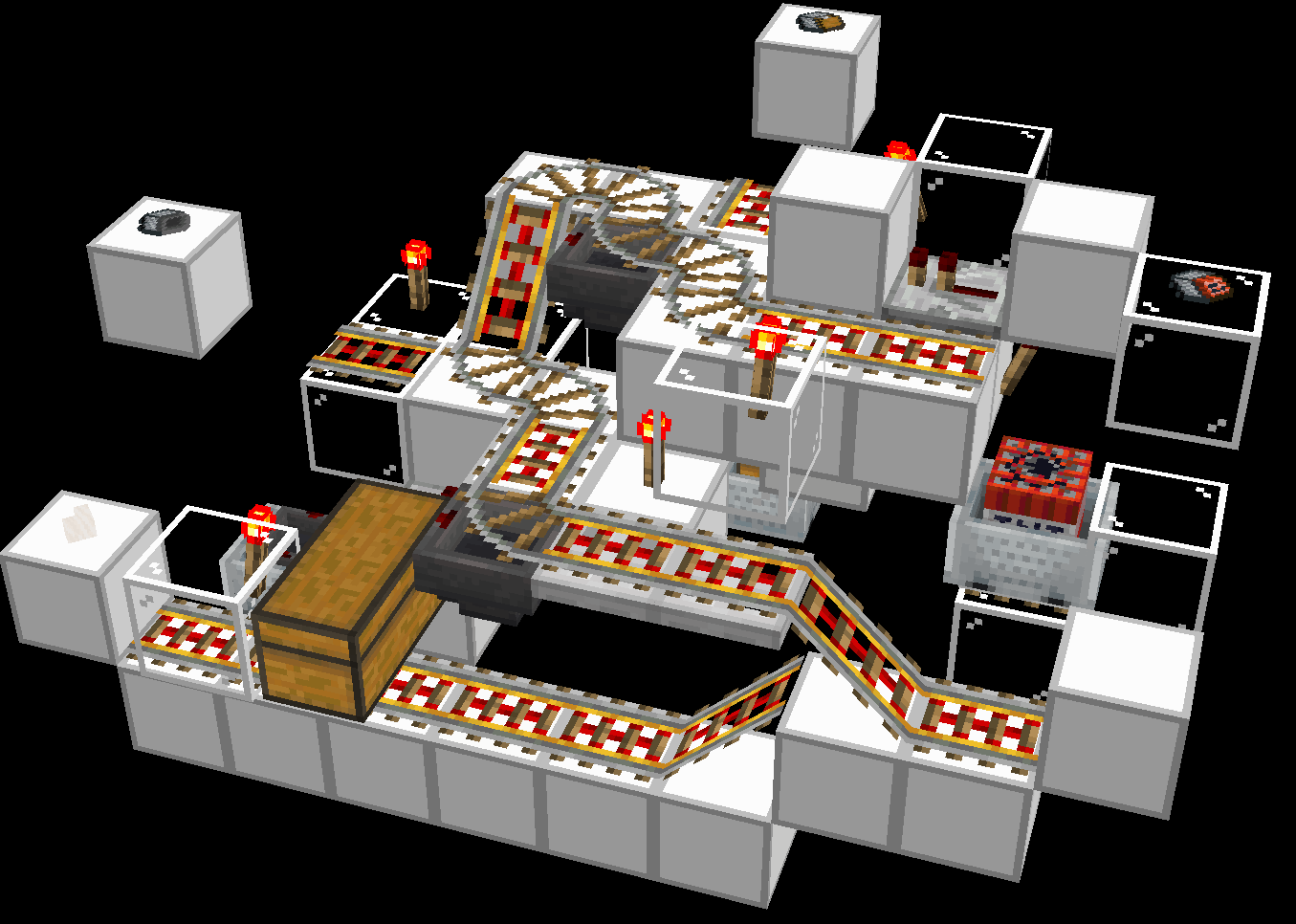 A Hopper Minecart, Chest MInecart, and TNT Minecart sorter by Xeno.
Netherite Tools/Armor:
Netherite tools can be sorted with their property of fire resistance. When passed through lava, most items will be set on fire, but netherite items do not. Flaming items will activate any campfire that they touch, and burning items will not be destroyed if they are picked up quickly. Detecting a flaming item falling onto a campfire allows netherite to be sorted.
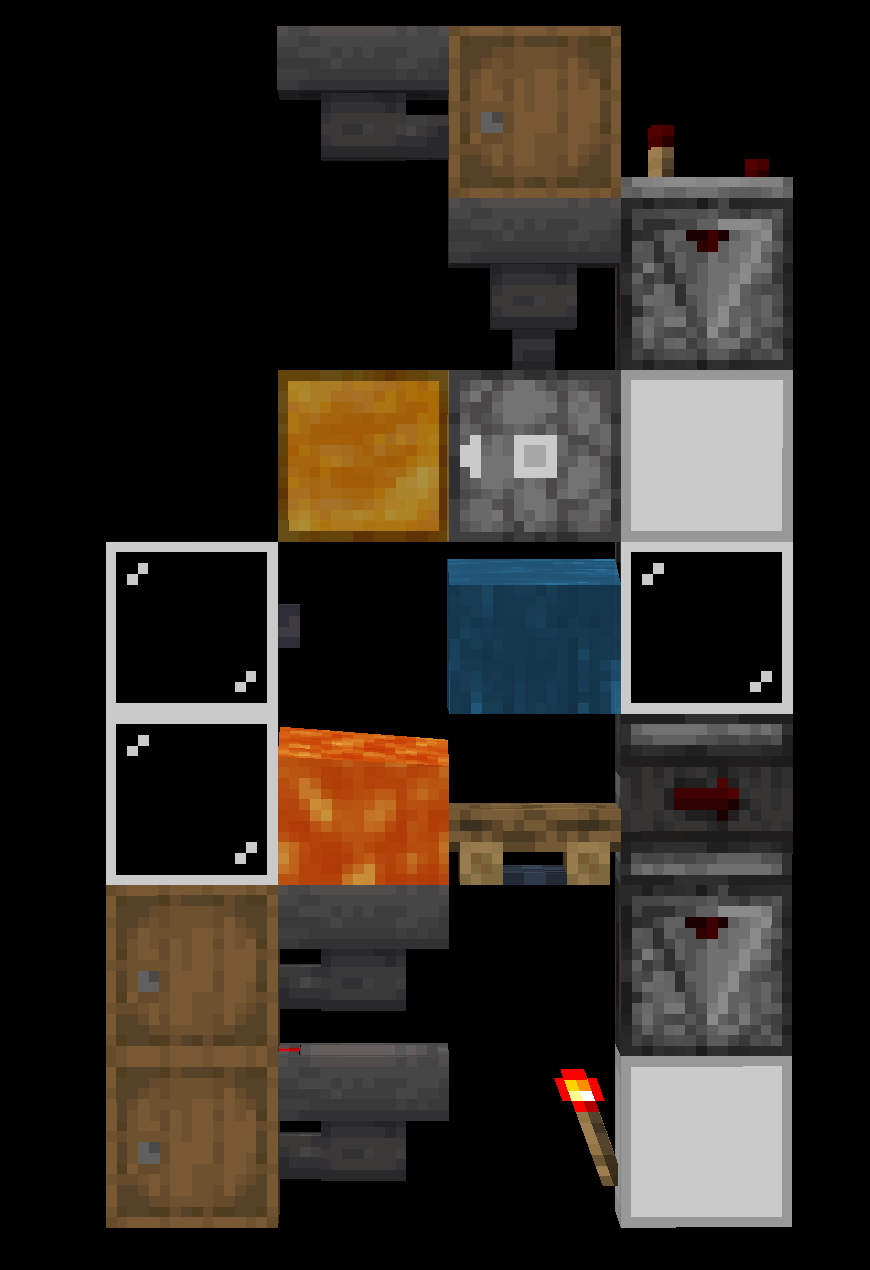
A netherite item sorter. No items are destroyed.
Crafter-Based Item Sorting
Crafters can be used to sort items via certain recipes that make it simple to check if it has succeeded. While its theoretically possible to destructively sort any item that is used in a recipe, doing so would be wildly impractical.
Nonstackable Sorting
Voiders
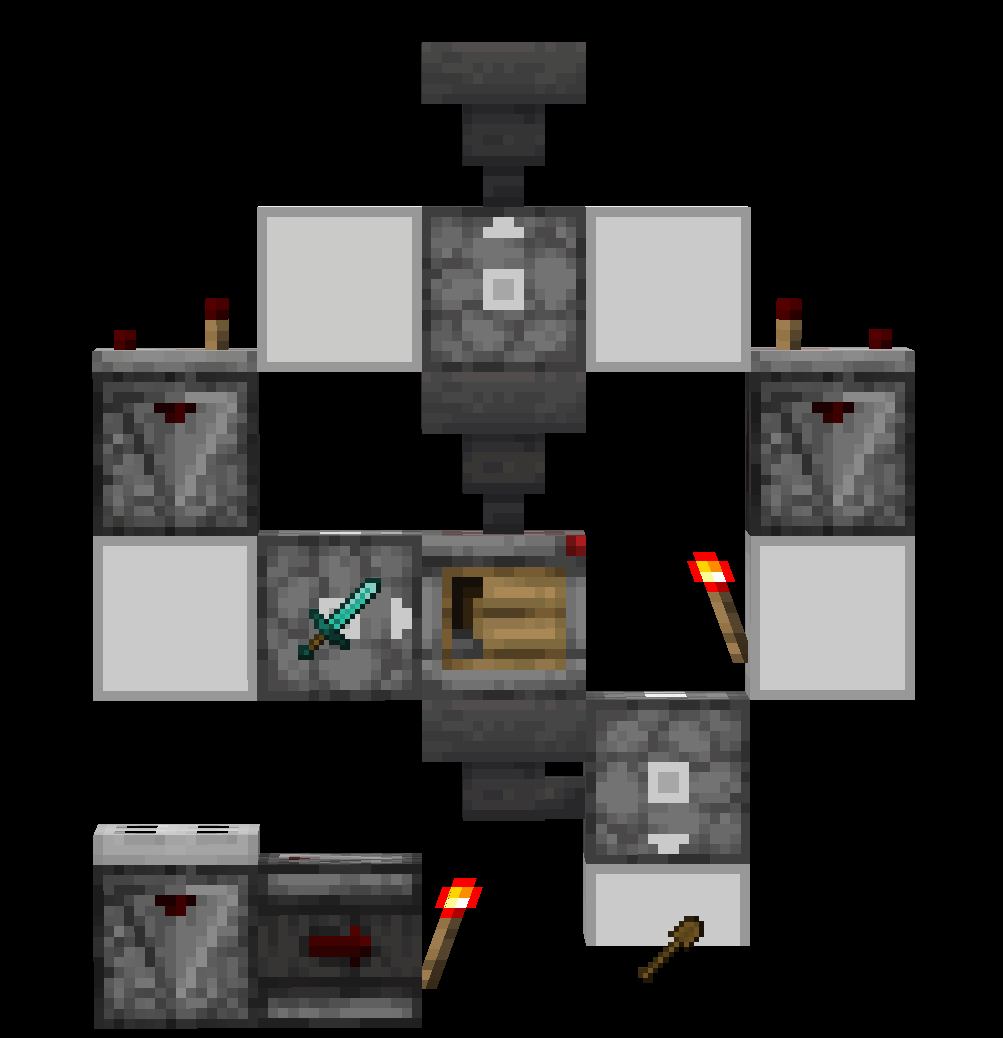
A voider attempts to craft an inputted nonstackable with a tool (aka an item with a durability bar) stored inside of the voider. If the inputted item matches the set tool (shown as a diamond sword in the image), they will be crafted together into a single tool using the crafting repair mechanic, destructively sorting it out. If the craft fails, the inputted item is removed from the crafter in time for the next input.
The following image is an example of a 1wt voider (by BigCitrusFruit). Note that 2wt voiders are signifigantly more versatile, as they can be set up sequentially to void a list of nonstackables.
 Dye Sorting
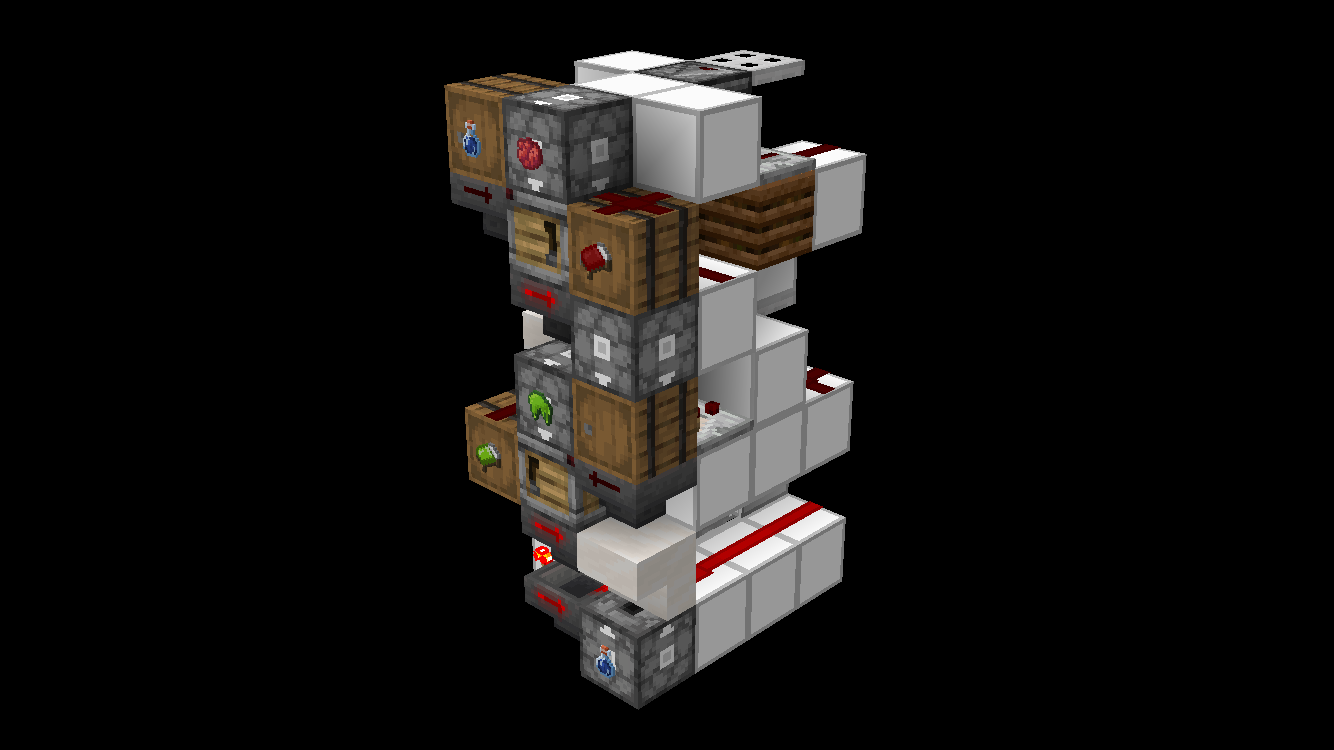
Some items may be partially destructively sorted by using the fact that they may be dyed. All inputted items are attempted to be dyed an initial colour, and any that succeed are separated at the crafter's output. Failed crafts are removed before the next input. Any failed crafts in the first stage are also attempted to be dyed again with a different color from the first stage. This is because an item that is dyed cannot be dyed its color. Any succeeded crafts are merged with the output from the first stage. Failed crafts are removed before the next input from the first stage.
There are multiple items that can be sorted with dye sorting, but only shulker boxes can be automatically separated afterwards. The list is as follows:
- Shulker Boxes
- Beds
- Bundles
The following image is an example of a dye sorter by FireBee.
Shields
Shields may be sorted with a very similar method to dye sorting, except by combining the shield with a banner. This is a destructive sorting method, as shields cannot be separated from a banner after they are combined. Note that shields already attached to a banner cannot be sorted. This is technically a combination sorting method, so any combination sorter design will allow this if given banners as input. Please do not sort shields like this.
Miscellaneous Crafter Sorting
Combination Sorting
Please note that combination sorting, with the exception of dye sorting, is quite impractical, and can mostly be replaced with normal item sorters.
- Cobblestone and stone bricks may be combined with moss or vines to make their mossy versions and sort out those blocks specifically.
Unwaxed copper may be combined with honeycomb in a crafter to wax them and sort those blocks specifically - Written books may be combined with book and quills up to 2 times. This copies the book and technically sorts it. Note that books that have been copied more than 2 times in a row cannot be sorted.
- Activated maps may be combined with unopened maps to copy them. This copies the map and technically sorts it.
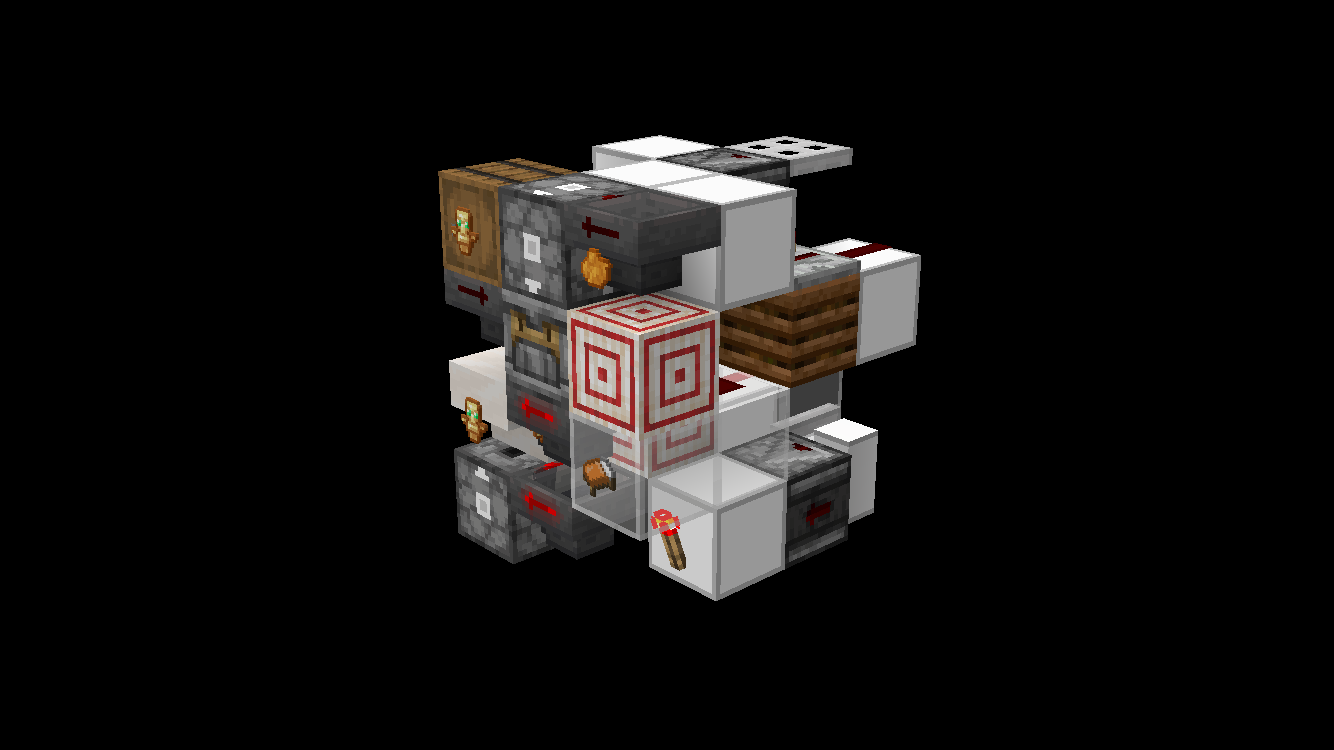
The image below is an example of a combination sorter by FireBee. The orange dye may be replaced with any combination sorting input, and the orange bed is the "sorted" item output.
Unsortable Nonstackables
The following is a list of all nonstackables that cannot be sorted without allays or voiders by sustainable means:
- All armors excluding netherite
- Pickaxes, shovels, swords, axes, hoes, excluding netherite.
- Bow
- Mace
- Crossbow
- Trident (technically sortable but not as an item)
- Spyglass
- All goat horns
- Totem of Undying
- Elytra
- Fishing Rod
- Carrot on a Stick
- Warped Fungus on a Stick
- All horse armors
- Saddle
- Wolf armor
- Milk Bucket
- All banner patterns
- Buckets with fish, axolotls, or tadpoles (kills the mob inside and sorts as a water bucket)
The following is a list of nonstackable items that can be sorted but share a category with other nonstackables which they cannot be differentiated without the use of allays.
- All potions, including lingering from splash and drinkable
- All netherite tools and netherite armor
- Boat wood types
- Chest boat wood types
- Bed colors (bed sorting leaves all beds as one of 2 colors)
- Shulker box colors
- Disc 11 and Creator (Music Box)
- Wait and Creator discs
- Pigstep and Precipice discs
- Otherside and relic discs
Crafter Tech
Compactors
A device that uses a single item type and crafts it. Mainly used to compact blocks using the 3x3 grid like: ingots > blocks. You can also have a “2 step compactor” this is a device that craft nuggets > ingots > blocks got example
but can also be used for other recipes if possible.
Uncrafter
The opposite of a compactor, it uncrafts a block back into its item form. Can sometimes also be used for any 1x1 recipes.
Universal Crafter
Can be used to craft any recipe. (sometimes limitations apply, such as not being able to use recipes with an unstackable item in them)
Prefilled / Preset Universal Crafter
Preset to a fixed recipe that cannot be changed dynamically, but can be set up for most recipes.
Factories
Factories are larger, complete builds that may include a range of crafters to mass-produce either one or multiple different output items. They do not necessarily have to be part of a farm.
Voiders
A system that crafts any items with durability with every inputed item. It will successfully craft if the two items match. And the output is sent directly back into the crafters second slot this is important
This works because you input two items and output one so we say the other was voided/deleted. It’s used to sort items that normally can’t like tridents from fishing rods in the example of a drowned farm. You void the fishing rods