These chunks will become unprocessed on server/world shutdown until loaded again. After which they will stay persistent across *that* session.
# Locked Chunks Locked chunks are chunks that exist and have references in memory but do not process any events. These chunks may behave like unprocessed chunks to the untrained eye, but if you put an entity in one and use **/testfor** you will see that it does still exist. These chunks are generally out of the way in terms of where they appear, so you aren't likely to interact with them in day to day gameplay. Locked chunks are only seen in one natural instance and that is bordering [unloaded chunks](https://bedrockwiki.com/books/chunks/page/view-chunks). ## Where are they As stated previously they appear around unloaded chunks, but in what way? Locked chunks create a 5x5 square around a given unloaded chunk. This is good to know when testing with unloaded chunks, because these chunks may cause unexpected behavior when you are building. 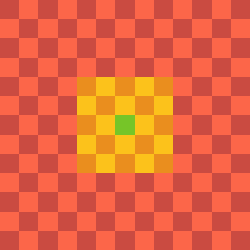 (Green is the [Unloaded chunk](https://bedrockwiki.com/books/chunks/page/view-chunks) and the yellow/orange is locked) # View Chunks View Chunks or Cached Chunks (but officially called view chunks) are chunks that have most but not all functionality disabled within them. These chunks are not simulated and cannot process things like block updates and pending ticks. These chunks do process some events however and knowing what does and does not work will help you be able to interact with these chunks in much more confidence. ## Where do they come from They come from only these sources: - End Gateway Pairing - Player Render Distance - Spawn Chunks - Maps - Various Commands - /teleport - /execute detect - /structure - /spreadplayers - /setblock - /fillblocks - /clone - /testforblock - /testforblocks - Lighting Updates. - Ticking AreasGreen means the view region is deconstructed after use. Yellow means the area is deconstructed after the owner disconnects. Red means the area is never deconstructed until the world restarts.
## What Works In Them The things we know to work in unloaded chunks: - Redstone circuit structure - Capacitors (E.g, Redstone Torches, Repeaters, Comparators) - Redstone Dust - Global Entities (Player Owned Projectiles, Ender Dragon, fireworks, lightning) - Block state changes from a wind charge - Sculk Spread - Block Creation - Tripwire - Target Block - Pressure Plate - Damaging/Killing Entities (Non-Global Entities will not be fully dead/deleted until simulated) - Artificial Entity Spawning - Breeze Projectile Redirection - Pending Tick Scheduling (Not execution) - Wind Charging effect. - Weaving EffectAlthough Observers are a "Pulse Capacitor" they cannot fire in unloaded chunks due to their reliance on pending ticks.
Since tridents are player-owned projectiles, they can fall through the world if they spawn in an unloaded chunk before the chunk’s block collision map is initialized especially when the world is running slowly. Grindstones are used to combat this.
## How it works under the hood This functionality is a product of # Invalid Chunks ## Invalid Chunks Invalid Chunks are chunks that simply do not exist anymore. These chunks have no references in the game's memory and are stored entirely on disk until they need be accessed again. These chunks fully delete anything that passes through them and save their current NBT state. These are the chunks that you get the "Chunk still loading. You may encounter some mild performance issues." so next time you get that message when teleporting or going too fast you have those chunks to thank. These chunks also process absolutely nothing as you might expect. ## Uses The main use for these chunks is falling block duplication. When a falling block turns into a block there is still 3 tick in which the entity still exists. Because an these chunks delete the entity references we can essentially bypass the deletion mechanism allowing us to have both the entity and the block. A more niche use is for NBT state saving. Using these chunks we save the NBT (Named Binary Tag) of an entity just as if it was loaded from a structure block. This allows us to keep certain tags that are useful for example the **minecraft:raid\_configuration** tag. This tag is useful because it is what makes witches throw healing/regeneration potions. This tag saving can be done by simply putting a the entity of choice into a portal. This will destroy the reference normally used to remove those tags when they aren't being used.These are represented by -1 in the game code.
# Loaded Chunks ### Loaded Chunks/Simulated Chunks Loaded Chunks also known as simulated chunks are the chunks that anything can normally process in. These chunks only occur around a player or created with the use of **/tickingarea** or **Add-ons.** These chunks are what players will spend their time interacting with a majority of the time.These chunks are represented by the hex code 0x0009 in the game code.
### Buffer Chunks Around every loaded chunk is a buffer of [unloaded chunks](https://bedrockwiki.com/books/chunks/chapter/view-chunks) this is to improve load times and general stability of the game. ### Loaded Area Size The size of the area of loaded chunks around a player is dependent on the **simulation distance** setting in the world settings and it comes in four different sizes 4 chunks, 6 chunks, 8 chunks, and 12 chunks. These sizes are not radii as you may be inclined to believe but instead follow [taxicab geometry](https://en.wikipedia.org/wiki/Taxicab_geometry), going from each corner of the central chunk containing the player. [](https://bedrockwiki.com/uploads/images/gallery/2025-09/DCtimage.png) (blue: sim 4, green: sim 6, yellow/orange: sim 8, pink/red: sim 10, purple: sim 12) ### Functions Chunks that are loaded/simulated are able to process anything you will find in normal gameplay such as: - Entity AI/Events - block ticking - random ticks - Entity statesIt is important to note that events can happen outside of these loaded chunks. See [unloaded chunks](https://bedrockwiki.com/books/chunks/page/view-chunks) for more information.
# Slime Chunks ## Slime Chunks Slime Chunks are chunks that have the ability to spawn the slime entity when a player is within spawning range. Slime chunks spawn slimes regardless of light level as long as there is a valid place for them to spawn. The game will only spawn slimes in slime chunks at y=40 and below so you don't have to worry about ever seeing them on the surface. Slime chunks are not randomized by seed and their positions can are interchangeable between worlds. If you find a slime chunk in one world you can go to those coordinates in another world and find the same place spawning slimes. ## How to find them Slime chunks can be found by four main methods. - [Chunkbase](https://www.chunkbase.com/) - [Resource Pack](https://github.com/RavinMaddHatter/Bedrock-Technical-Resource-Pack) - Trial and Error - Already knowing the locations Depending on your use case and conditions one option may be more suitable than the others. # Chunks ## Chunks, What are they? Chunks are 16x16 partitions of space on a Minecraft world that the game will load individually around a player or based on certain conditions. The reason why this is done is because the game is 30 million blocks by 30 million blocks big and loading all that at once would be take an extremely large amount of computation. There are a few differences in chunks that dictate what they can and cannot do, these differences are very important to memorize if you want to get into technical Minecraft. ## Chunk States/Types There is a variety of chunks which do certain things these include: - [Slime Chunks](https://bedrockwiki.com/books/chunks/page/slime-chunks) - [Loaded Chunks](https://bedrockwiki.com/books/chunks/page/loaded-chunks) - [Unloaded Chunks](https://bedrockwiki.com/books/chunks/page/view-chunks) - [Locked Chunks](https://bedrockwiki.com/books/chunks/page/locked-chunks) - [Unprocessed Chunks](https://bedrockwiki.com/books/chunks/page/invalid-chunks) ## Subchunks Subchunks are 16x16x16 subdivisions of a given chunk to improve load times and to help prevent the game from loading things that don't need to be. Subchunks divide the parent chunk along the vertical axis and inherits the load state of it. A given Subchunk may determine very small things and is mostly related to client side rendering. The reason why Subchunks exist is to try and avoid storing an entire chunk in a single giant array and prevent unneeded lag for the same reason chunks exist. ## Chunk Codes Bedrock edition defines a given chunk by an internal assigned code system; these are used to keep track of what chunk state a given chunk is in.| **Chunk State** | **Byte Code** |
| Unloaded | 0x0000 |
| Generating | 0x0001 |
| Generated | 0x0002 |
| PostProcessing | 0x0003 |
| PostProccessed | 0x0004 |
| CheckForReplacementData | 0x0005 |
| NeedLighting | 0x0006 |
| Lighting | 0x0007 |
| LightingFinished | 0x0008 |
| Loaded | 0x0009 |
| Invalid | -1 |
Not all structures in Minecraft generate in a perfectly predictable way.
## Per-Chunk Processing Chunks may process some things separately from each other and knowing about these discrepancies can save you headache*s* when building a machine. Chunks will process all events it can within one chunk before starting on the events in another making it so that each chunk executes at different times. Ticking areas have priority in this and will always be executed before any other chunks allowing you to determine which cross-chunk event will happen first. (E.g, two pistons extending into the same tile) This order is predictable and changes every 20 ticks, so if you know what order the chunks are in for the 1st tick you will also know the order for the next 19 but not anything after. Chunks also have their own independent [pending tick](https://bedrockwiki.com/books/tick-system/page/pending-ticks) queue and will only process pending ticks within the borders of its own chunk.