View Chunks
Spawn Chunks
Against popular belief spawn chunks DO exist on bedrock edition. These chunks around a given player's spawn point and are there mostly for performance reasons. If you have ever went into a portal and came back you will know that the transfer from nether to overworld is much faster than the opposite. This is because of spawn chunks. This can help you load those chunks to the ticking status much quicker than if they were fully unprocessed. These chunks form a rounded 11x11 square of unloaded chunks and of course bordering them is a rounded 15x15 square of locked chunks.
Where do they come from?
Spawn chunks are a consequence of
void Player::updateSpawnChunkView();
which is called by these functions to move the spawn chunk view region to where you last set your spawn.
void Player::setBedRespawnPosition(BlockPos const& bedPosition);
void Player::setRespawnPosition(BlockPos const& inRespawnPosition, DimensionType dimension);
bool Player::setSpawnBlockRespawnPosition(BlockPos const& spawnBlockPosition, DimensionType dimension);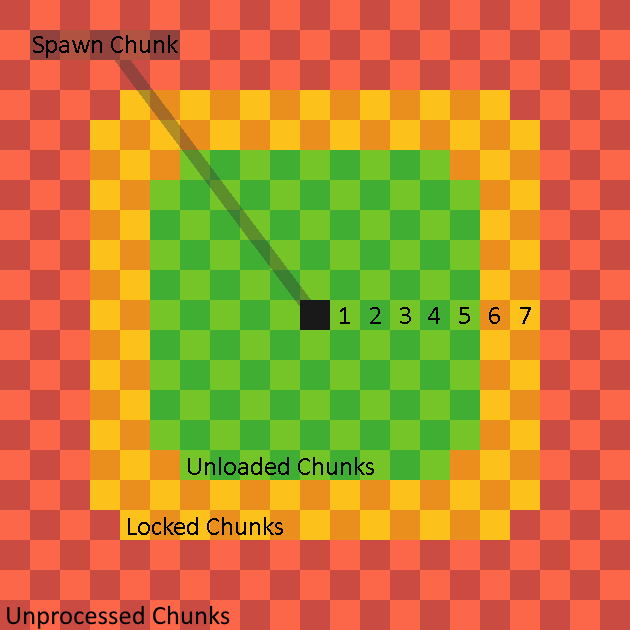
(Visualization by @kiwixite on discord)
These chunks will become unprocessed on server/world shutdown until loaded again. After which they will stay persistent across that session.
Locked Chunks
Locked chunks are chunks that exist and have references in memory but do not process any events. These chunks may behave like unprocessed chunks to the untrained eye, but if you put an entity in one and use /testfor you will see that it does still exist. These chunks are generally out of the way in terms of where they appear, so you aren't likely to interact with them in day to day gameplay. Locked chunks are only seen in one natural instance and that is bordering unloaded chunks.
Where are they
As stated previously they appear around unloaded chunks, but in what way? Locked chunks create a 5x5 square around a given unloaded chunk. This is good to know when testing with unloaded chunks, because these chunks may cause unexpected behavior when you are building.

(Green is the Unloaded chunk and the yellow/orange is locked)
View Chunks
View Chunks or Cached Chunks (but officially called view chunks) are chunks that have most but not all functionality disabled within them. These chunks are not simulated and cannot process things like block updates and pending ticks. These chunks do process some events however and knowing what does and does not work will help you be able to interact with these chunks in much more confidence.
Where do they come from
They come from only these sources:
- End Gateway Pairing
- Player Render Distance
- Spawn Chunks
- Maps
- Various Commands
- /teleport
- /execute detect
- /structure
- /spreadplayers
- /setblock
- /fillblocks
- /clone
- /testforblock
- /testforblocks
- Lighting Updates.
- Ticking Areas
Green means the view region is deconstructed after use. Yellow means the area is deconstructed after the owner disconnects. Red means the area is never deconstructed until the world restarts.
What Works In Them
The things we know to work in unloaded chunks:
- Redstone circuit structure
- Capacitors (E.g, Redstone Torches, Repeaters, Comparators)
- Redstone Dust
- Global Entities (Player Owned Projectiles, Ender Dragon, fireworks, lightning)
- Block state changes from a wind charge
- Sculk Spread
- Block Creation
- Tripwire
- Target Block
- Pressure Plate
- Damaging/Killing Entities (Non-Global Entities will not be fully dead/deleted until simulated)
- Artificial Entity Spawning
- Breeze Projectile Redirection
- Pending Tick Scheduling (Not execution)
- Wind Charging effect.
- Weaving Effect
Although Observers are a "Pulse Capacitor" they cannot fire in unloaded chunks due to their reliance on pending ticks.
Since tridents are player-owned projectiles, they can fall through the world if they spawn in an unloaded chunk before the chunk’s block collision map is initialized especially when the world is running slowly. Grindstones are used to combat this.
How it works under the hood
This functionality is a product of