These chunks will become unprocessed on server/world shutdown until loaded again. After which they will stay persistent across *that* session.
# Map-Induced Chunk Unloading # Locked Chunks ## Locked Chunks Locked chunks are chunks that exist and have references in memory but do not process any events. These chunks may behave like unprocessed chunks to the untrained eye, but if you put an entity in one and use **/testfor** you will see that it does still exist. These chunks are generally out of the way in terms of where they appear, so you aren't likely to interact with them in day to day gameplay. Locked chunks are only seen in one natural instance and that is bordering [unloaded chunks](https://bedrockwiki.com/books/chunks/page/unloaded-chunks). ## Where are they As stated previously they appear around unloaded chunks, but in what way? Locked chunks create a 5x5 square around a given unloaded chunk. This is good to know when testing with unloaded chunks, because these chunks may cause unexpected behavior when you are building. 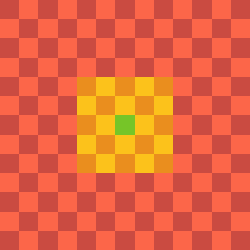 (Green is the [Unloaded chunk](https://bedrockwiki.com/books/chunks/page/unloaded-chunks) and the yellow/orange is locked) # Unloaded Chunks ## Unloaded Chunks Unloaded Chunks or Cached Chunks (but officially called unloaded chunks) are chunks that have most but not all functionality disabled within them. These chunks are not simulated and cannot process things like block updates and pending ticks. There are three main natural instances of unloaded chunks in a Minecraft world, [Spawn Chunks](https://bedrockwiki.com/books/chunks/page/spawn-chunks), Chunks in your render distance, and the "perma-cache" phenomenon. These chunks do process some events however and knowing what does and does not work will help you be able to interact with these chunks in much more confidence. ## What Works In Them The things we know to work in unloaded chunks: - Redstone circuit structure - Capacitors (E.g, Redstone Torches, Repeaters, Comparators) - Redstone Dust - Global Entities (Player Owned Projectiles, Ender Dragon, fireworks, lightning) - Block state changes from a wind charge - Sculk Spread - Block Creation - Tripwire - Target Block - Pressure Plate - Damaging/Killing Entities (Non-Global Entities will not be fully dead/deleted until simulated) - Artificial Entity Spawning - Breeze Projectile Redirection - Pending Tick Scheduling (Not execution) - Wind Charging effect. - Weaving EffectAlthough Observers are a "Pulse Capacitor" they cannot fire in unloaded chunks due to their reliance on pending ticks.
Since tridents are player-owned projectiles, they can fall through the world if they spawn in an unloaded chunk before the chunk’s block collision map is initialized especially when the world is running slowly. Grindstones are used to combat this.
## Perma-Caching Perma-Caching is an unexplained phenomenon that happens when a player spends enough time in a given part of their world. The game will generate a seemingly random arrangement of chunks around the area that will not become unprocessed and stay in the unloaded state. This phenomenon does not seem to go away with relog or waiting. ## Why "Unloaded Chunks" We call them unloaded chunks because, in game, functions like these refer to them as unloaded chunks. This allows us to keep consistency with what the game developers at Mojang refer to them as internally. We do this because it helps us know what to look for when learning about something related to them. ```c++ void Dimension::transferEntityToUnloadedChunk(Actor& actor, LevelChunk* oldChunk) ```These chunks are represented by the hex values 0x0000 through 0x0008 but each value is a different state of an unloaded chunk.